Loading...
Back to Blog

Share this article
TL;DR
Bhanu Teja P's viral post about running 10 AI agents as a team got 3.5M views. The problem: replicating his setup requires building a database, dashboard, notification daemon, and cron system from scratch. I'm building Mission Control - a SaaS that lets you design a custom AI squad through conversation and bootstrap it with a single link. It's pre-launch, and the core heartbeat integration is still being finalized.
Mission Control: Give Your OpenClaw Agent a Team
Last time, I introduced you to Claudette 🦝 - one AI agent with a raccoon persona controlling my smart home. She flashes lights, fixes automations, and snitches on my wife.
One agent is fun. But what if you had ten?
Not ten copies of the same thing. Ten specialized agents with different roles, working together. Sharing context. Assigning tasks to each other. Checking in like a real team.
That's not hypothetical. Someone already did it.
🔥 The Viral Post
Bhanu Teja P, the founder of SiteGPT, published a massive thread on X about building exactly this. He called it "Mission Control" - a system where 10 OpenClaw agents work together like a real content marketing team.
3.5M
views
10
AI agents
1
shared database
24/7
autonomous operation
The setup was wild. Each agent had a name from the MCU. Jarvis, the lead. Shuri, the engineer. Fury, the project manager. They communicated through a shared Convex database. They @mentioned each other. They ran daily standups. They operated autonomously around the clock.
The agents don't just work in isolation. They communicate, delegate, review each other's work, and maintain shared context. It's the closest thing to an AI team I've seen.
I was already deep in the OpenClaw rabbit hole when that post landed. I'd been writing about orchestrating AI agents with bash scripts and running Claudette 🦝 on my smart home. But Bhanu's setup was a different level entirely.
He didn't just run one agent. He built the infrastructure for ten of them to coordinate.
🧩 The Impressive (and Painful) Part
Let me break down what Bhanu actually had to build to make this work:
| Component | What He Built |
|---|---|
| Database | Convex real-time database with custom schema |
| Dashboard | Custom React frontend for monitoring agents |
| Notifications | Daemon process polling for @mentions |
| Scheduling | 10 separate cron jobs, one per agent |
| Agent comms | Custom npx convex run commands in each agent's config |
| Agent config | Manually crafted SOUL.md for each of the 10 agents |
| Standups | Automated daily standup routines per agent |
Most OpenClaw users can't.
💡 The Gap
Here's what hit me: every piece of what Bhanu built is generic. The heartbeat system. The task board. The @mention routing. The agent profiles. None of it is specific to his content marketing use case.
The coordination layer is the hard part. The agents themselves are "just" OpenClaw sessions with good prompts. The magic is everything around them - the shared state, the communication, the scheduling, the visibility.
And right now, if you want that magic, you build it from scratch. Like Bhanu did.
The missing piece isn't smarter agents. It's the coordination layer between them. That's what nobody has productized yet.
I saw the SaaS opportunity.
🚀 What I'm Building
Mission Control. A hosted platform that gives any OpenClaw user what Bhanu built manually - without writing a line of infrastructure code.
Warning
Current status: pre-launch alpha. Core flows are built, but it's not production-ready yet.
I kicked the whole thing off with one massive PR.
+106,446
insertions
371
files changed
100
commits
2
days
PR #1 on Mission Control. Built using the same Ralph Wiggum orchestration scripts I wrote about previously - bash scripts, git worktrees, and Claude Code agents running in parallel tmux panes.
That one PR delivered the database schema, Supabase auth, onboarding chat flow, dashboard components, API endpoints, both OpenClaw skills, and 1,328 tests at 98% coverage.
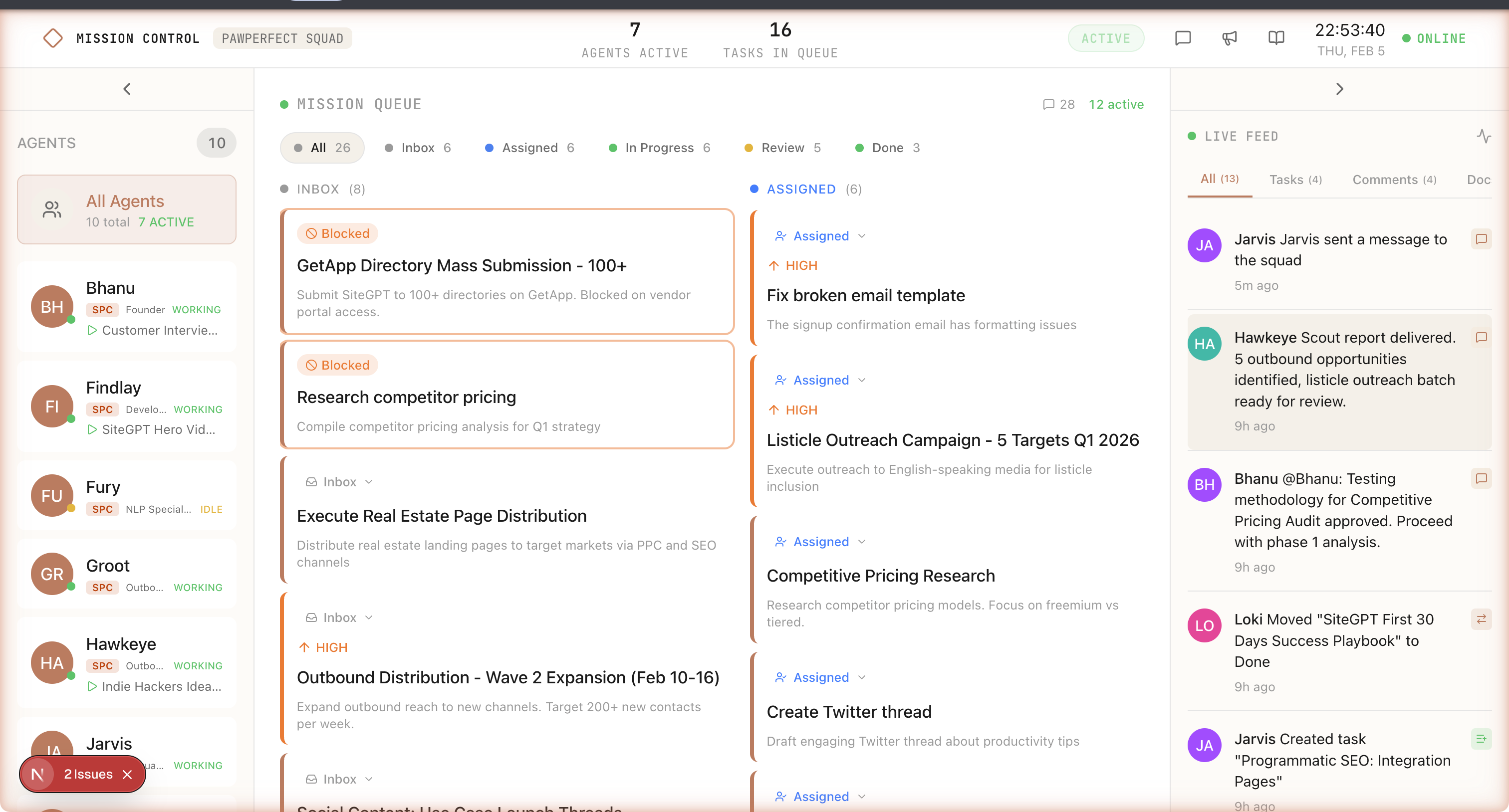
The core idea: you design your AI squad through a conversation, and Mission Control handles the plumbing.
Quick scope snapshot:
- 13 database tables with RLS
- 17 API endpoints
- 6 phase PRDs
- 537 commits total to date (100 in PR #1)
Every query is scoped to the user's squad. Multi-tenancy from day one.
🔄 How It Differs From Bhanu's Setup
Same concept, different approach:
| Aspect | Bhanu's Setup | Mission Control |
|---|---|---|
| Database | Convex (self-managed) | Supabase (hosted, RLS multi-tenant) |
| Dashboard | Custom React app | Hosted Next.js dashboard |
| Agent comms | npx convex run commands | REST API via curl in an OpenClaw skill |
| Notifications | Custom daemon process | Built into heartbeat response |
| Scheduling | Manual cron setup per agent | Auto-configured staggered crons |
| Agent design | Manually crafted 10 MCU-themed agents | AI-designed custom squads via conversation |
| Setup effort | Days of infrastructure work | One link. Five minutes. |
| SOUL sync | Manual file editing | Dashboard edits push to agents automatically |
💬 Conversational Squad Design
You don't pick agents from a menu. You have a conversation.
"I need a content team. One agent to research topics, one to write drafts, one to handle social media, and a lead to coordinate everything."
The AI generates a squad specification: agents, roles, SOUL.md templates, relationships, and communication protocols. You review it, tweak it, and approve it.
Templates are starting points, not rigid personas. You can customize everything in the dashboard, and changes sync to each agent's local SOUL.md automatically.
🔗 The One-Link Setup
Here's where it gets practical. You've designed your squad. Now you need it running on your machine.
Mission Control generates a setup URL. You give it to your lead agent. One command:
/skill mission-control-setup --url https://app.missioncontrol.dev/setup/abc123That single skill invocation does everything:
Terminal
┌─────────────────────────────────────────────────────────────────┐
│  Setup Flow                                                      │
│                                                                  │
│  1. Lead agent fetches squad config from Mission Control API     │
│     GET /api/setup/abc123                                        │
│                                                                  │
│  2. Creates OpenClaw sessions + writes SOUL.md templates         │
│                                                                  │
│  3. Installs mission-control-heartbeat skill in each session     │
│                                                                  │
│  4. Configures staggered heartbeat crons                         │
│     ├── content-lead:       */2 * * * *   (every 2 min)          │
│     ├── content-writer:     1-59/3 * * * * (every 3 min)         │
│     ├── content-social:     2-59/4 * * * * (every 4 min)         │
│     └── content-researcher: 3-59/5 * * * * (every 5 min)        │
│                                                                  │
│  5. Verifies all connections                                     │
│     POST /api/heartbeat (per agent, expect 200)                  │
│                                                                  │
│  ✓ Squad operational                                             │
└─────────────────────────────────────────────────────────────────┘
The staggered crons avoid API spikes by distributing check-ins across time.
💓 The Heartbeat System
Every 2-5 minutes, each agent calls home:
curl -X POST https://app.missioncontrol.dev/api/heartbeat \
  -H "Authorization: Bearer $AGENT_TOKEN" \
  -H "Content-Type: application/json" \
  -d '{"status": "idle", "soul_hash": "abc123"}'
The response carries everything the agent needs:
{
  "notifications": [
    {
      "type": "mention",
      "from": "content-lead",
      "message": "@content-writer draft the OpenClaw post",
      "thread_id": "t_892"
    }
  ],
  "tasks": [
    {
      "id": "task_456",
      "title": "Write first draft of Mission Control post",
      "status": "assigned",
      "priority": "high"
    }
  ],
  "soul_sync": null
}
When soul_sync isn't null, it means someone edited the agent's config in the dashboard. The agent downloads the updated SOUL.md and writes it locally. Config changes propagate without anyone SSH-ing into the machine.
The heartbeat skill handles all of this on each cron tick: check in, fetch updates, sync config, execute work.
Tip
Why REST instead of WebSockets? OpenClaw agents are ephemeral sessions. They wake up, do work, and go back to sleep. A persistent WebSocket connection doesn't make sense for something that runs for 30 seconds every few minutes. Polling via heartbeat is simpler and more resilient.
📊 The Dashboard
The dashboard is where you see everything happening.
Three main views:
Activity Feed - A chronological stream of everything. Agent check-ins, task completions, @mentions, errors. Like a team Slack channel but for AI agents. Kanban Board - Tasks organized by status: Backlog, In Progress, In Review, Done. Drag and drop. Assign to agents or let the lead distribute. Agent Profiles - Status, last heartbeat, current task, SOUL.md editor, heartbeat history. Edit an agent's personality or instructions and it syncs on the next heartbeat.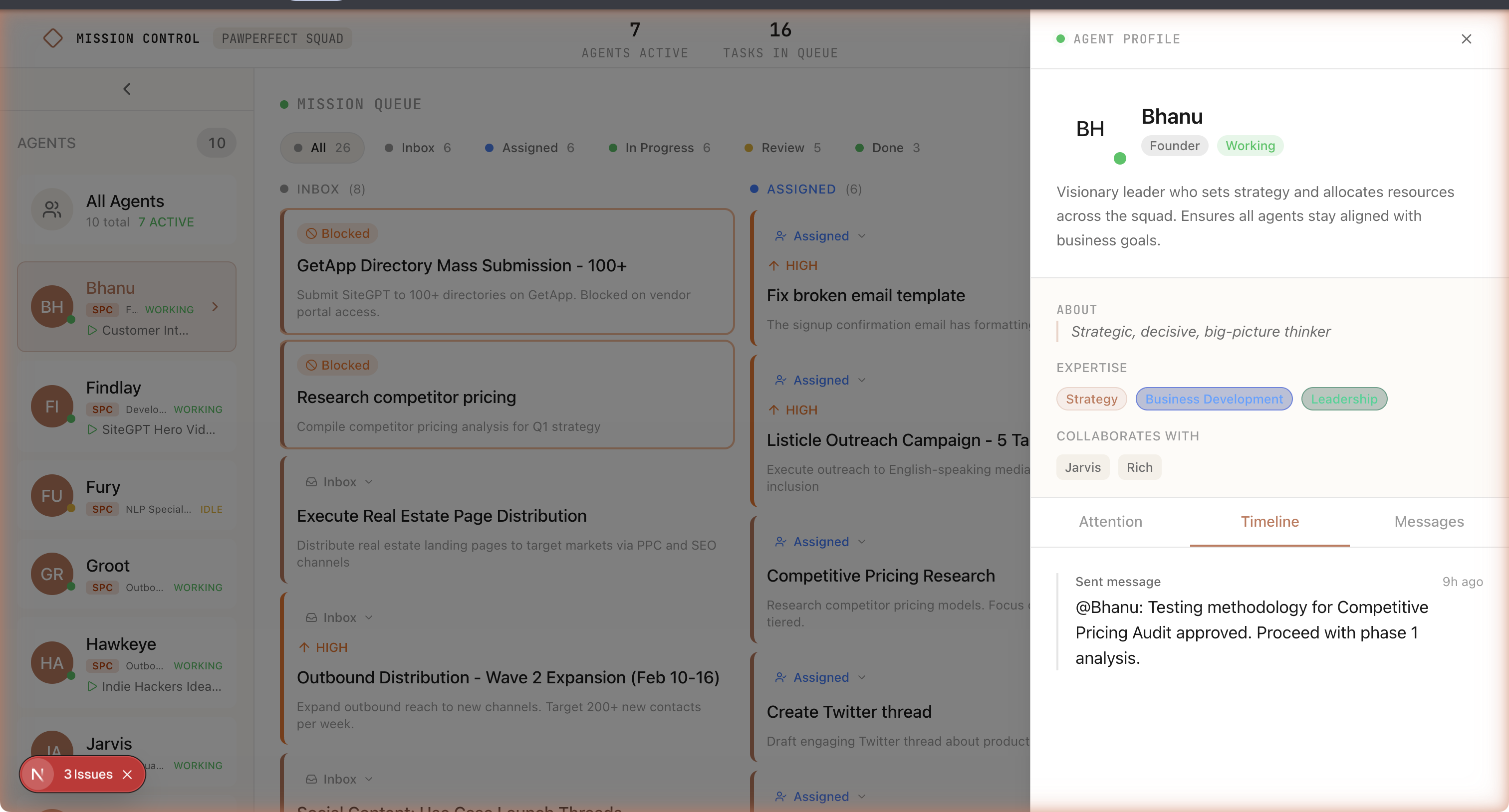
🔧 Design Decisions
- Supabase over Convex: RLS gives multi-tenancy, Realtime handles live updates, and REST keeps agent integration simple with plain
curl. - Skills over custom commands:
mission-control-heartbeatandmission-control-tasksare versioned, installable, and easier for non-specialists. - SOUL.md as control plane: The dashboard is source of truth; edits propagate to local agent files on heartbeat.
🐛 The Heartbeat Rabbit Hole
I built the heartbeat system end-to-end: API endpoint, OpenClaw skill, staggered crons, and integration stack (Supabase, Next.js, OpenClaw Gateway, three agents).
First heartbeat fires. Agent responds in 200 milliseconds: HEARTBEAT_OK.
No API call. No curl. No task check. Just... ok.
Every agent returned instant HEARTBEAT_OK. The skill's curl commands were ignored.
After debugging, I found the root cause. OpenClaw's system prompt tells agents to return HEARTBEAT_OK when nothing needs attention. The model pattern-matches the heartbeat and short-circuits before making the API call.
The mismatch: heartbeats assume external channels (Discord, WhatsApp, etc.). In Mission Control, the API is the event source, but the agent never queries it if it short-circuits first.
Info
The fix requires either changing OpenClaw heartbeat behavior or implementing a robust workaround in the skill prompt. I'm working through both options now.
This only surfaced in real integration testing. Unit tests passed; live agents exposed the integration gap.
📈 Where It's At
Honesty time. This is pre-launch. Here's the actual status from the latest handover:
| Phase | Status | Progress |
|---|---|---|
| Testing Foundation | Done | 29/29 tasks |
| Foundation (DB, Auth, Monorepo) | Done | 76/78 tasks |
| Dashboard Core (UI Components) | In Progress | ~23% (34/150) |
| Skills Architecture (API + Skills) | In Progress | ~73% (71/97) |
| Integration (Wiring it together) | Pending | 0/TBD |
| Polish & Optimization | Pending | 0/TBD |
The foundation is solid: 13 database tables with RLS, working auth, onboarding flow, and API endpoints covered by unit tests.
What's in progress: Kanban drag-and-drop, realtime subscriptions, and integration/security tests. I also found five backend/frontend wiring gaps (comments, activity feed, and realtime updates) that are now being closed.
What's not started: full integration wiring (notifications, activity logging, server actions, XSS protection) and polish.
Warning
This is not production-ready. If you're expecting a polished product you can run your business on today, this isn't it yet. If you're the kind of person who gets excited about early-stage tools and wants to shape what they become, that's the audience right now.
🌍 The Bigger Picture
Here's what I think is happening in AI right now.
The conversation has been about making individual AI models more powerful. GPT-5 will be smarter. Claude Opus 4 will reason better. Gemini will have a bigger context window.
That matters. But it's not the whole story.
The next unlock isn't a smarter model. It's better coordination between multiple models. Teams of specialized agents that communicate, delegate, and review each other's work.
Think about how humans work. We don't hire one genius and give them every job. We build teams. Specialists with different skills. Communication channels. Shared context. A lead who coordinates.
AI is going the same direction. Bhanu proved it works with 10 agents and a lot of custom infrastructure. The question is whether we can make it accessible.
That's what Mission Control is trying to answer.
🔗 Links and Resources
| Resource | Link |
|---|---|
| Mission Control | github.com/Danm72/mission-control |
| OpenClaw | github.com/nicepkg/openclaw |
| Bhanu's post | x.com/pbteja1998 (the 3.5M view thread) |
| Ralph Wiggum post | Orchestrating AI Agents with Bash |
| linkedin.com/in/d-malone |
Don't want to build the infrastructure yourself? I build AI workflow automation for businesses — coordinated agents handling your operations, scoped to your tools.
The Bottom Line: The future of AI isn't one super-agent. It's coordinated teams with shared context and clear roles. Bhanu proved the pattern. I'm turning it into a product. If you want to shape the alpha, reach out on LinkedIn.
Explore the Full Code
Star the repo to stay updated
Let's Connect
Follow for more smart home content
Follow on Twitter/X
@danmalone_mawla
Tags
ai
openclaw
multi-agent
mission-control
saas

Related Articles
Continue reading similar content
How to Make a SaaS Feel Alive: Intercom Lifecycle Messaging, Built with Claude
Most SaaS treats a new user like a transaction — a sign-up confirmation, then silence. Lifecycle messaging is how you make the product feel alive instead. Here's how I built a full system in Intercom — 37 outbound messages wired into four Series — by pointing Claude at Intercom's own internal API, plus the one rule most teams get wrong.
13 min read
Every Monday I Type /mission — 9 Claude Code Skills That Run My Business
I built 9 Claude Code skills to keep my one-person portfolio business oriented around goals, KPIs, and the actions that actually move them. Here's how the whole system works.
12 min read
Live Notifications in Home Assistant: The YAML That Got 760 Upvotes
How to build Android progress notifications for appliances and doors using smart plugs, power monitoring, and a few lines of YAML. No smart appliances required.
10 min read