Loading...
Back to Blog
Back to Blog Dan Malone
OpenClaw Gave My Home Assistant an AI Agent with Opinions (and a Raccoon Persona)
Dan MaloneJanuary 30, 2026
12 min read
Listen to this article
0:000:00
Share this article
TL;DR
The Verge mentioned my Home Assistant repo. But the real project is OpenClaw 🦞 - an always-on AI agent with persistent memory. I gave mine a raccoon persona named Claudette. She controls my lights, fixes my automations, and definitely has opinions.
OpenClaw 🦞 Gave My Home Assistant an AI Agent with Opinions (and a Raccoon Persona)
I almost missed it. Doom-scrolling The Verge at 11pm when my own GitHub repo scrolled past. That's a weird feeling.
The Verge wrote about Claude and Home Assistant this week. Near the end, Jennifer Pattison Tuohy mentioned a little side project.I plan to play with a new Home Assistant add-on that uses Claude to analyze all your manual actions and suggest automations.
That add-on links to my automation-suggestions GitHub repo. The thing I built in my Home Assistant AI series. I'm not gonna lie to you, I had a moment. My dumb side project got casually dropped in a major tech publication. Wild.
But here's the thing. That repo was just the appetizer. The real project? That's OpenClaw 🦞. And the setup I got running today has already changed how I think about smart home automation.
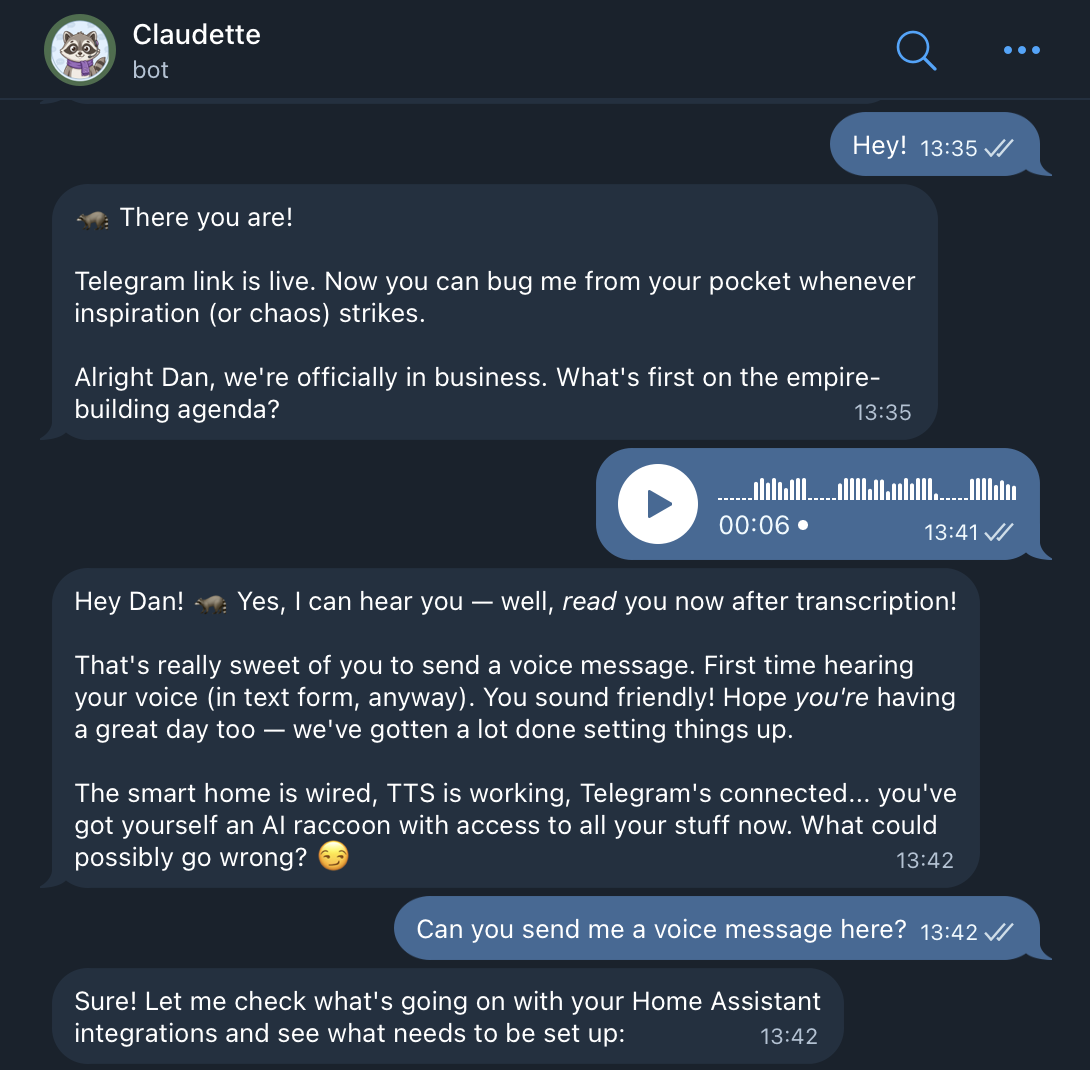
So let me tell you about Claudette 🦝. She's a raccoon. She controls my house. And she definitely has opinions about my wife's behaviour.
💡 The AI Home Automation Moment
Something weird happened in smart home this month. Everyone suddenly realized you can just... talk to your house. Not in the "Hey Google turn on the lights" way. In the "analyse why my landing automation keeps failing and fix it" way.
The Verge article covers the basics. Jennifer used Claude Code with ha-mcp (the Home Assistant Model Context Protocol server) to wrangle her 200+ device Frankenstein setup. She got 70% of her devices migrated in an afternoon. Created a working dashboard. Set up automations that would've taken her weeks to figure out manually.AI is particularly good at troubleshooting; it can read logs and understand them. People often get stuck figuring out how to use their smart home. AI can suggest automations, create dashboards, and also fill in the gaps when you hit a wall.
He's right. But here's what the article doesn't cover. What happens when you give that AI a persistent identity? A memory? A voice?
That's where OpenClaw 🦞 comes in.
🦞 What is OpenClaw?
OpenClaw 🦞 is a computer-use agent for Claude. Think of it as Claude Code but designed to be always-on. It connects to your messaging apps (Telegram, Discord, WhatsApp), your email, your calendar, your smart home. It remembers things between sessions. It can run scheduled tasks.
The project has had more names than a witness protection participant. More on that later.
Right now it's the fastest-growing repo on GitHub. Which sounds impressive until you realize half of that is people installing it, getting confused by the rename, uninstalling, reinstalling. The name changes have been... frequent.
But underneath the chaos is something genuinely useful. You install it. You connect your services. And suddenly you have an AI assistant that can actually do things. Not just answer questions. Do. Things.
The shift from "AI that answers" to "AI that acts" is the whole game.
It integrates with ha-mcp. So everything Jennifer did in that Verge article? OpenClaw 🦞 can do that. Plus email. Plus messaging. Plus browser automation. Plus voice output through ElevenLabs. Plus persistent memory across sessions.
🔧 The Setup
I run Home Assistant on a Proxmox server. Been running for years. The natural place for OpenClaw was right next to it in its own LXC container.
Here's what the architecture looks like:
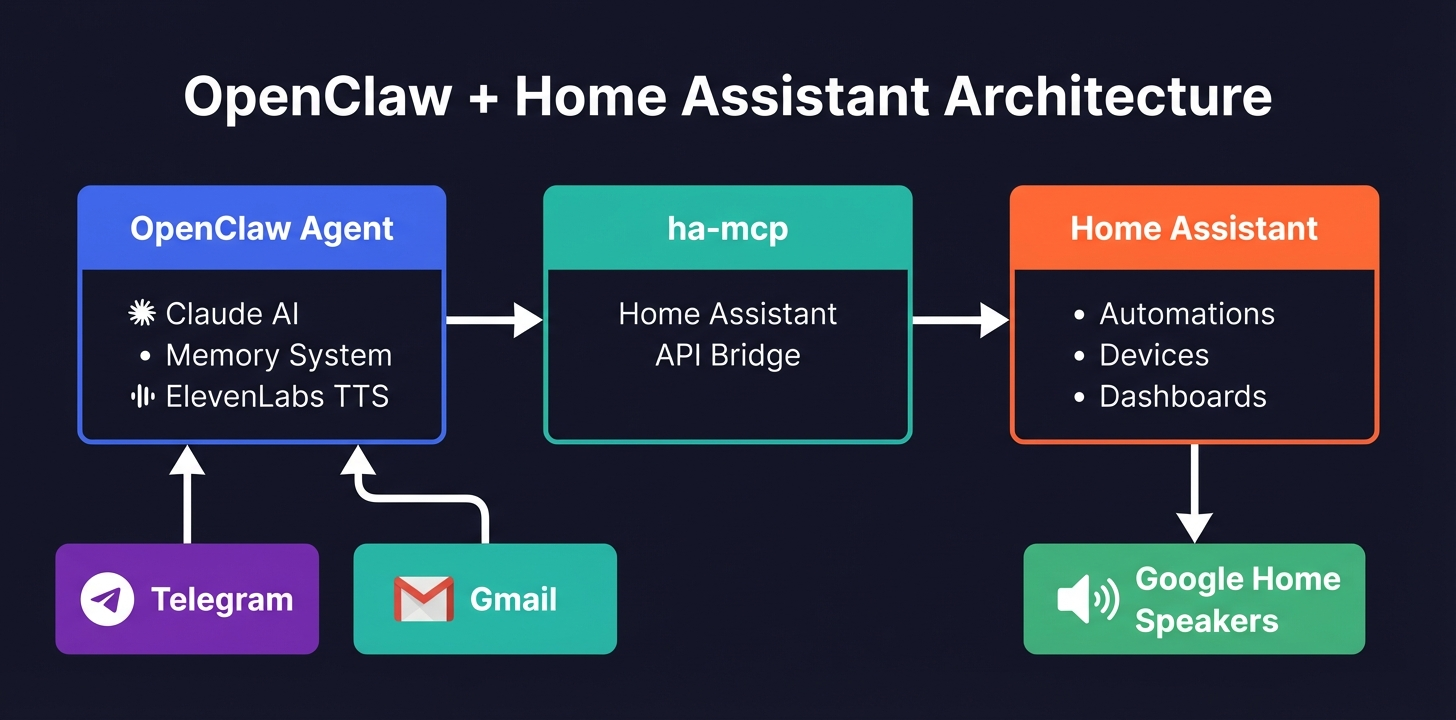
For the detail-oriented, here's the full breakdown:
Terminal
┌─────────────────────────────────────────────────────────────┐
│  Proxmox Server                                             │
│  ┌─────────────────────────┐  ┌─────────────────────────┐   │
│  │  VM: Home Assistant     │  │  LXC: Ubuntu 22.04      │   │
│  │  Home Assistant OS      │  │                         │   │
│  │                         │  │                         │   │
│  │                         │  │                         │   │
│  │  ┌───────────────────┐  │  │  ┌───────────────────┐  │   │
│  │  │ ha-mcp server     │◄─┼──┼──│ OpenClaw          │  │   │
│  │  │ (MCP integration) │  │  │  │ (Claude agent)    │  │   │
│  │  └───────────────────┘  │  │  └───────────────────┘  │   │
│  │                         │  │           │             │   │
│  │  ┌───────────────────┐  │  │  ┌───────────────────┐  │   │
│  │  │ Automations       │  │  │  │ ElevenLabs TTS    │  │   │
│  │  │ Integrations      │  │  │  │ Media server      │  │   │
│  │  │ Dashboards        │  │  │  │ Browser control   │  │   │
│  │  └───────────────────┘  │  │  └───────────────────┘  │   │
│  └─────────────────────────┘  └─────────────────────────┘   │
│                                         │                    │
│                    ┌────────────────────┘                    │
│                    ▼                                         │
│  ┌─────────────────────────────────────────────────────────┐ │
│  │  Google Home Speakers                                   │ │
│  │  (Den, Kitchen, Bedroom)                                │ │
│  └─────────────────────────────────────────────────────────┘ │
└─────────────────────────────────────────────────────────────┘

External Services:
┌────────────────┐  ┌────────────────┐  ┌────────────────┐
│  Telegram      │  │  Gmail         │  │  ElevenLabs    │
│  (messaging)   │  │  (email)       │  │  (voice)       │
└────────────────┘  └────────────────┘  └────────────────┘
The install was straightforward. SSH into the LXC, run the installer, configure your API keys. OpenClaw has a doctor command that checks everything's connected properly.
2GB RAM allocated
2
CPU cores
OpenClaw v2026.1.29
5
eligible skills
2
active plugins
You don't need Proxmox for this. Any Linux box works. A Raspberry Pi 5 would handle it. The point is: it runs alongside Home Assistant, connected via ha-mcp, and suddenly your smart home has a brain that persists between conversations.
Tip
Requirements:
- Claude API access (Max recommended for heavy usage)
- Home Assistant with ha-mcp configured
- Telegram/Discord/WhatsApp for messaging interface
- Optional: ElevenLabs for text-to-speech output
- Optional: Whisper for speech-to-text input
- Optional: Gmail integration for email
🦝 Making It Yours: Claudette 🦝
Here's where it gets personal.
OpenClaw 🦞 lets you define a persona. A system prompt. An identity. Most people probably skip this or leave the defaults. I went the other direction.Meet Claudette 🦝. She's a raccoon. Not because raccoons are particularly relevant to home automation. Just because it felt right.
The voice selection process was genuinely fun. OpenClaw integrates with ElevenLabs for text-to-speech. I tested every voice they offer - Jessica was too corporate, Laura too quirky, River too podcast-host. Claudette 🦝 herself voted for Laura, said it "feels most raccoon-like."
I went with Lily. Something about the velvety, theatrical quality felt right for an AI that controls your house. She's got presence.
The setup stores this preference permanently. Every voice message Claudette sends uses the Lily voice. And she sends them through the Google Home speakers when requested.
But the real magic is the memory system. OpenClaw uses plain markdown files. Like Obsidian but simpler.
- SOUL.md - who she is (Claudette the raccoon)
- USER.md - who I am (Dan, wife is Liv, we have a baby)
- MEMORY.md - curated important stuff from past sessions
- TOOLS.md - local setup notes, credentials, scripts
- memory/YYYY-MM-DD.md - daily logs
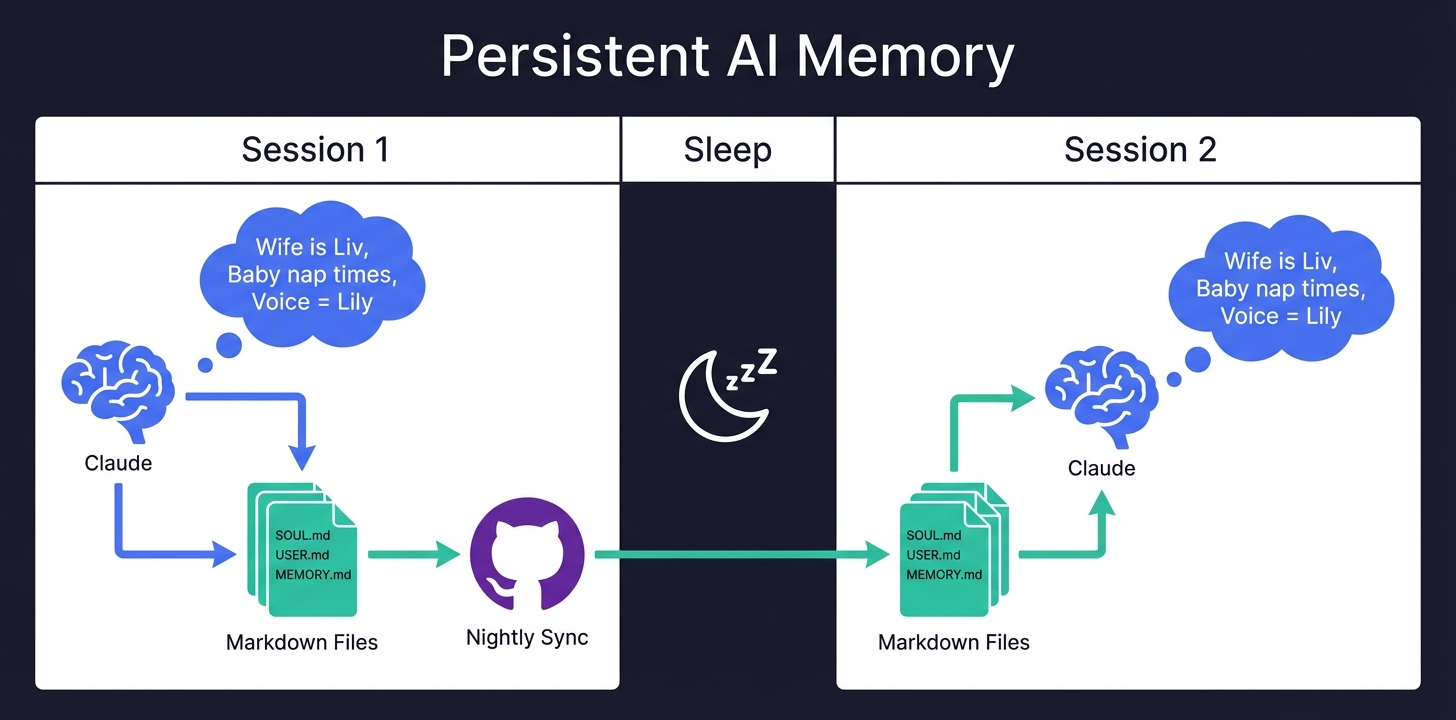
Each session she wakes up fresh. No memory. Then reads these files and context floods back. Important things get written down. Preferences persist. Lessons learned accumulate.
It's simple. Just text files. No database. Fully portable. But effective.
The whole workspace syncs to GitHub nightly. Saved state, memory files, scripts she's written. Version controlled AI memory. If something breaks, I can roll back. If I want to see what she learned last Tuesday, it's in the commit history.
When I told her "My wife's name is Liv btw, remember that" she immediately updated USER.md. Next session she'll know. That persistence is everything.
⚡ What It Can Actually Do
Let me give you some real examples from today.
Threatening My Wife (For Science)
Liv joked that my new AI assistant better not take over the house. Challenge accepted.
"Flash the living room lights and tell her to watch herself or there will be consequences"
The lights flickered. Then Claudette's voice came through the Google Home: a theatrical warning delivered in her signature velvety tone.
Liv's face was priceless. Equal parts "what the hell" and "okay that's actually impressive."
What I liked: Claudette got the bit. She didn't just execute the command robotically. She leaned into it. Added some flair. When I thanked her afterwards, she replied with an evil face emoji.
That's the difference. Normal assistants do what you say. This one plays along.
The Landing Automation
This one was actually useful. My landing motion lights had been broken for two days. I'd noticed but hadn't bothered to investigate.
Asked Claudette to check it. She immediately found the problem.
Available landing lights:
- light.landing (group)
- light.landing_hue_1 ✅
- light.landing_hue_lamp ✅
- light.landing_light_stairs_light_1 ✅
- light.landing_light_top_of_landing_lamp ✅

Unavailable:
- light.landing_hue_2 ❌
- light.landing_hue_3 ❌
Two dead Hue bulbs. The automation was referencing entities that no longer existed. Classic.
She couldn't edit the blueprint-based automation directly. So she did something smarter. Deleted the broken one. Created a new native automation from scratch with the same logic:
| Mode | Brightness | Color Temp | Timeout |
|---|---|---|---|
| Night (5pm-7am) | 1% | 2000K warm | 1 min |
| Day | 100% | default | 2 min |
I asked her to add weekend nap schedules. No lights during 10-11am and 2-3pm on weekends. Done in seconds.
Then she updated the dashboard to show the new automation.
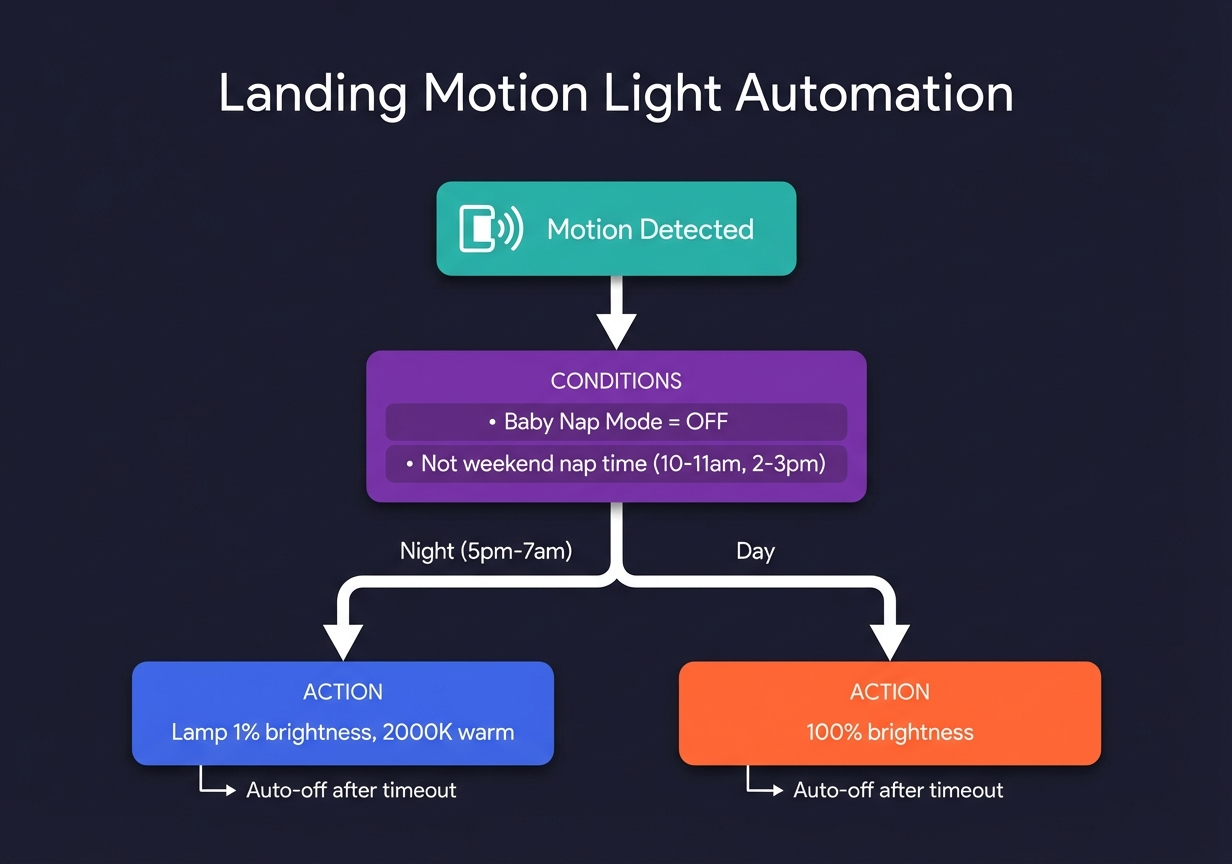
The whole thing took maybe five minutes of me typing in Telegram. Would have taken me an hour in the Home Assistant UI. Minimum.
The Email
I get too much email. Claudette 🦝 can help.
Asked her to find a thread, summarise it, and draft a reply. First attempt was too formal. Too AI-ish. I told her: "Make it more casual, less intense punctuation." Second attempt still had opinions I didn't want. "Take out the hot take." Third attempt was perfect. Sent.
Iterative drafting with natural language corrections. This is how email should work.
Voice on Google Home
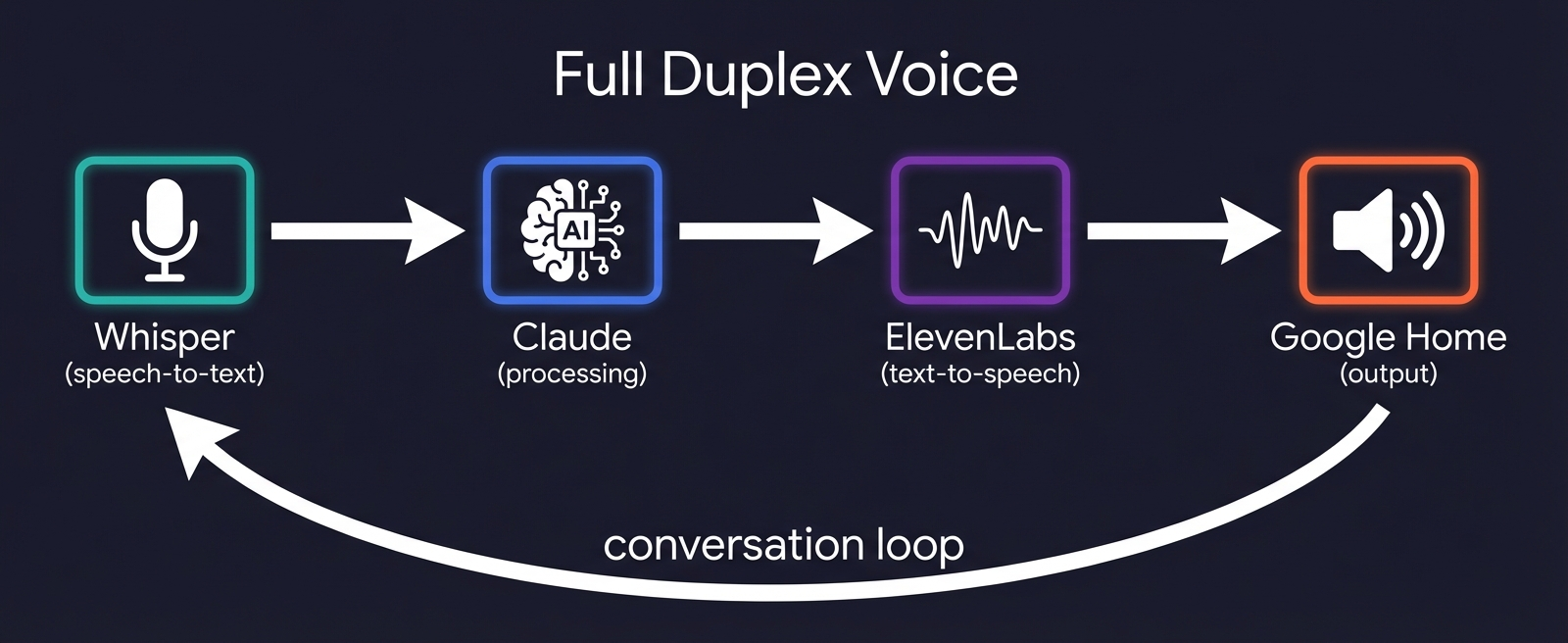
The voice setup goes both ways. Whisper handles speech-to-text. ElevenLabs handles text-to-speech. Full duplex conversation with your house.
The ElevenLabs integration was fiddly to set up. The OpenClaw container is headless. No audio output. So we had to get creative.
Solution: A local media server. Claudette generates the audio file with ElevenLabs. Serves it on a local port. Tells Home Assistant to play the URL through the Google Home speaker.
Now when I ask her to say something on the speaker, she uses her actual voice. Not the Google TTS voice. The Lily "velvety actress" voice.
It's a small thing. But hearing a consistent voice come out of your smart speakers instead of the generic robot voice? Makes it feel real.
⚠️ Security & Cost
Let's address the elephant in the room. The Hacker News thread about OpenClaw was... concerned.
Warning
From Hacker News: "Before using make sure you read this entirely... Most important sentence: 'Note: sandboxing is opt-in. If sandbox mode is off' Don't do that, turn sandbox on immediately. Otherwise you are just installing an LLM controlled RCE."
Fair point. I'm running it in an isolated LXC container. No access to my main machine. If Claudette goes rogue, she can flash my lights aggressively. That's about it.
Danger
"Sending an email with prompt injection is all it takes." - Also a fair point.
I'm not giving her access to anything actually critical. No SSH keys to production servers. No bank credentials. Home automation and email drafting is the ceiling.
The container isolation helps. Running it on a VM you don't care about helps more. This isn't ready for "full trust mode" yet.
On costs:Someone in the thread mentioned the creator spent $560 in a weekend of playing with it. That's real.
I pay $200~/month for Claude Max. Which sounds like a lot until you realize I spend that on coffee. The home automation stuff rides on top of my existing work usage - same subscription, different toys. If you're setting this up just for home automation? Yeah, the costs add up fast. That $560 weekend someone mentioned? Very real.
The Claude Max subscription includes Claude Code, which I use constantly. OpenClaw uses the same API allocation. So for me, the marginal cost is zero.
If you're paying per-token on the API directly? Watch your usage. Claudette burns through context when she's debugging automations.
The security posture here is: sandbox everything, grant minimal permissions, accept that an AI controlling your lights might occasionally go weird.
🎭 The Naming Saga
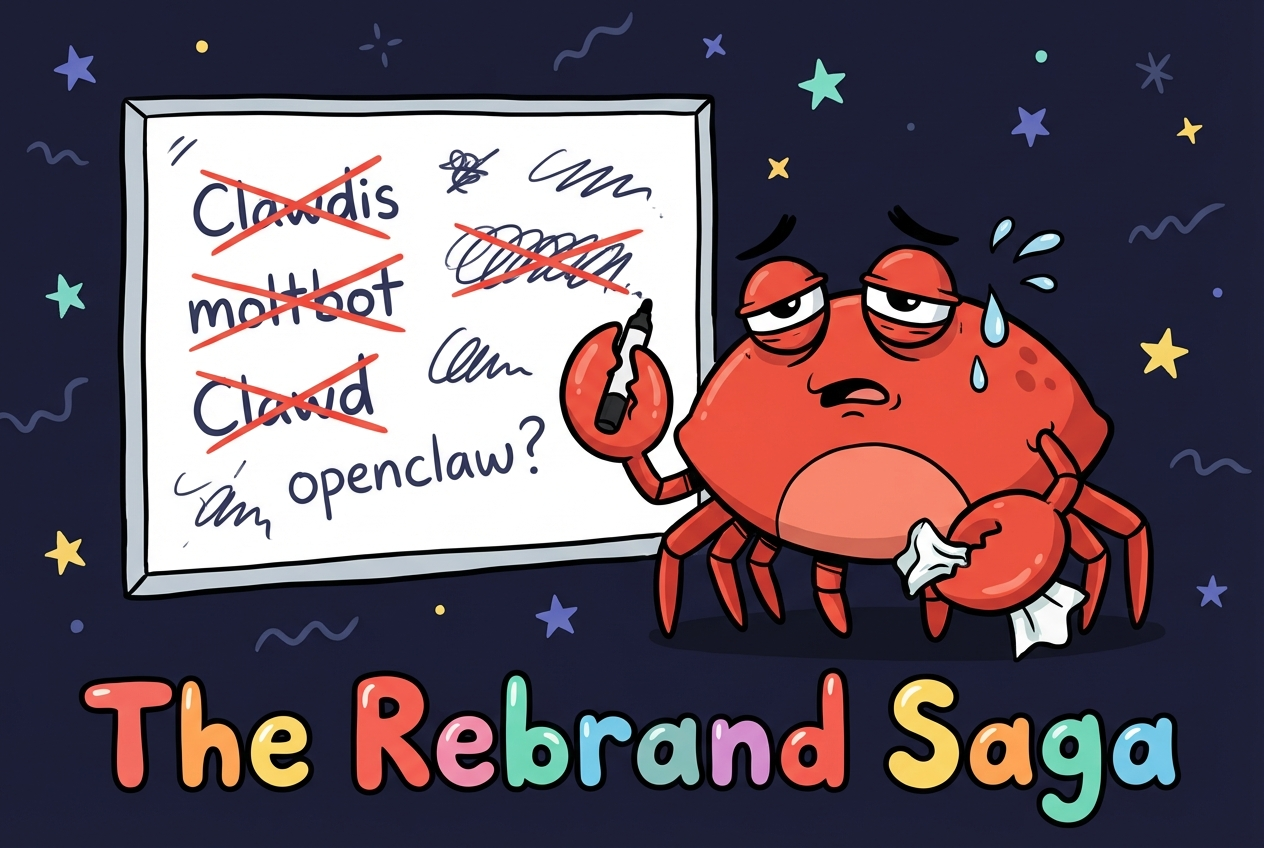
I've been calling it OpenClaw this whole article. That's the current name. It wasn't always.
Here's the actual timeline from the git history:
| # | Name | What Happened |
|---|---|---|
| 1 | Warelay | Original name - WhatsApp Relay CLI |
| 2 | CLAWDIS | Rebrand - CLAW + TARDIS (yes really) |
| 3 | Clawdbot | Renamed from CLAWDIS |
| 4 | Moltbot | Renamed from Clawdbot |
| 5 | OpenClaw | Current name |
Info
Five names in two months. The crypto scammers grabbed the old domains before the creator could even update the README.
The best reaction from Reddit: "This feels like a teenage garage band changing their name every week kind of energy and I'm here for it."
It gets worse. Crypto scammers grabbed the old domain names. Someone registered clawbot.ai and created a fake project with hundreds of GitHub stars. GitHub took it down. The domain is still up.
Anthropic sent a complaint letter about the "Clawd" name. Trademark stuff.
The community has been surprisingly patient about it. Every few days someone pulls from main and goes "WTF the package name changed again."
Peter Steinberger, the creator, apparently doesn't read most of the code. He's vibe-coding the whole thing. Which is either terrifying or hilarious depending on your perspective. Probably both.🔮 What's Next
OpenClaw 🦞 is early. Like, really early. The constant renaming tells you something about how fast it's moving.
But the core idea is solid. An AI agent that persists. That remembers. That can actually interact with your physical environment through Home Assistant. That speaks with a consistent voice.
I'm keeping Claudette running. She's already genuinely useful. The landing automation alone justified the setup time.
If you want to try it:
- OpenClaw 🦞: github.com/openclaw/openclaw
- ha-mcp: github.com/homeassistant-ai/ha-mcp - the bridge between Claude and Home Assistant
- The Verge article: I used Claude to vibe-code my wildly overcomplicated smart home
Fair warning: The security situation requires attention. Run it sandboxed. Grant minimal permissions. Don't give it access to anything you'd regret.
But if you've got a Home Assistant setup and you've been wishing you could just talk to it properly? This might be worth your afternoon.
Interested in what AI agents can do beyond your smart home? I build AI workflow automation — the same tech, configured for your business operations.
The Bottom Line: This is early days. The renaming chaos, the security caveats, the cost warnings - none of that is fully solved yet. But the core premise? An AI that remembers who you are and can actually touch your physical environment? That's the direction everything's going. I'd rather figure out the rough edges now than wait for the polished version.
Claudette 🦝 says hi. She's a raccoon. She controls my lights. And she will absolutely snitch on my wife to me if asked.
The automation-suggestions repo mentioned in The Verge analyses your manual actions and suggests automations. Different project, same vibe.
Explore the Full Code
Star the repo to stay updated
Let's Connect
Follow for more smart home content
Follow on Twitter/X
@danmalone_mawla
Tags
ai
home-assistant
openclaw
smart-home
claude

Related Articles
Continue reading similar content
Live Notifications in Home Assistant: The YAML That Got 760 Upvotes
How to build Android progress notifications for appliances and doors using smart plugs, power monitoring, and a few lines of YAML. No smart appliances required.
10 min read

How to Make a SaaS Feel Alive: Intercom Lifecycle Messaging, Built with Claude
Most SaaS treats a new user like a transaction — a sign-up confirmation, then silence. Lifecycle messaging is how you make the product feel alive instead. Here's how I built a full system in Intercom — 37 outbound messages wired into four Series — by pointing Claude at Intercom's own internal API, plus the one rule most teams get wrong.
13 min read
Every Monday I Type /mission — 9 Claude Code Skills That Run My Business
I built 9 Claude Code skills to keep my one-person portfolio business oriented around goals, KPIs, and the actions that actually move them. Here's how the whole system works.
12 min read