Loading...

Back to Blog
Back to Blog Dan Malone
Ralph Wiggum: Orchestrating AI Agents to Migrate a 3-Year-Old Codebase
Dan MaloneJanuary 28, 2026
15 min read
View Source Code
github.com/Mawla/ralph-wiggum-orchestration
Connect on LinkedIn
in/d-malone
Follow on Twitter/X
@danmalone_mawla
Share this article
Ralph Wiggum: Orchestrating AI Agents to Migrate a 3-Year-Old Codebase
I had a problem. A Next.js + Sanity CMS project I built in January 2023 was stuck on the pages router with outdated dependencies. The last commit was from July 2024. It needed to jump to Next.js 16, React 19, App Router, and Sanity 5. That's not a quick afternoon refactor. That's weeks of tedious, error-prone migration work.
So I didn't do it manually. I wrote four bash scripts, pointed them at 28 phase PRDs, and let Claude Code do the work.
+12,003
insertions
-5,142
deletions
236
files changed
271
commits
Three days. The project was on modern everything.
This post walks through the toolkit I built to make that happen. The scripts are generic. They're not tied to Next.js or Sanity. If you can break your work into numbered phases with checkbox tasks, Ralph Wiggum can run it.
The Problem
The project, Agency-Starter-Framework, had been in active development through late 2023 and then went quiet. By January 2026, it was roughly 3 years old and multiple major versions behind on its core dependencies. The migration path looked something like this:
- Pages Router to App Router
- React 18 to React 19
- Next.js 14 to Next.js 16
- Sanity 3.x to Sanity 5.x with the new APIs
- Every component, query, and route needed touching
I could sit down and do this manually. I've done migrations like this before. But the scope was large enough that it would take weeks of focused effort, and the work is mostly mechanical. Perfect for AI.
The catch: no single Claude Code session can handle a migration this large. Context windows fill up. Sessions timeout. And the work has natural dependencies: you can't migrate blocks to App Router before you've set up the App Router itself.
I needed parallelism, isolation between simultaneous agents, progress tracking that survives crashes, and visual verification for UI changes. I needed an orchestrator.
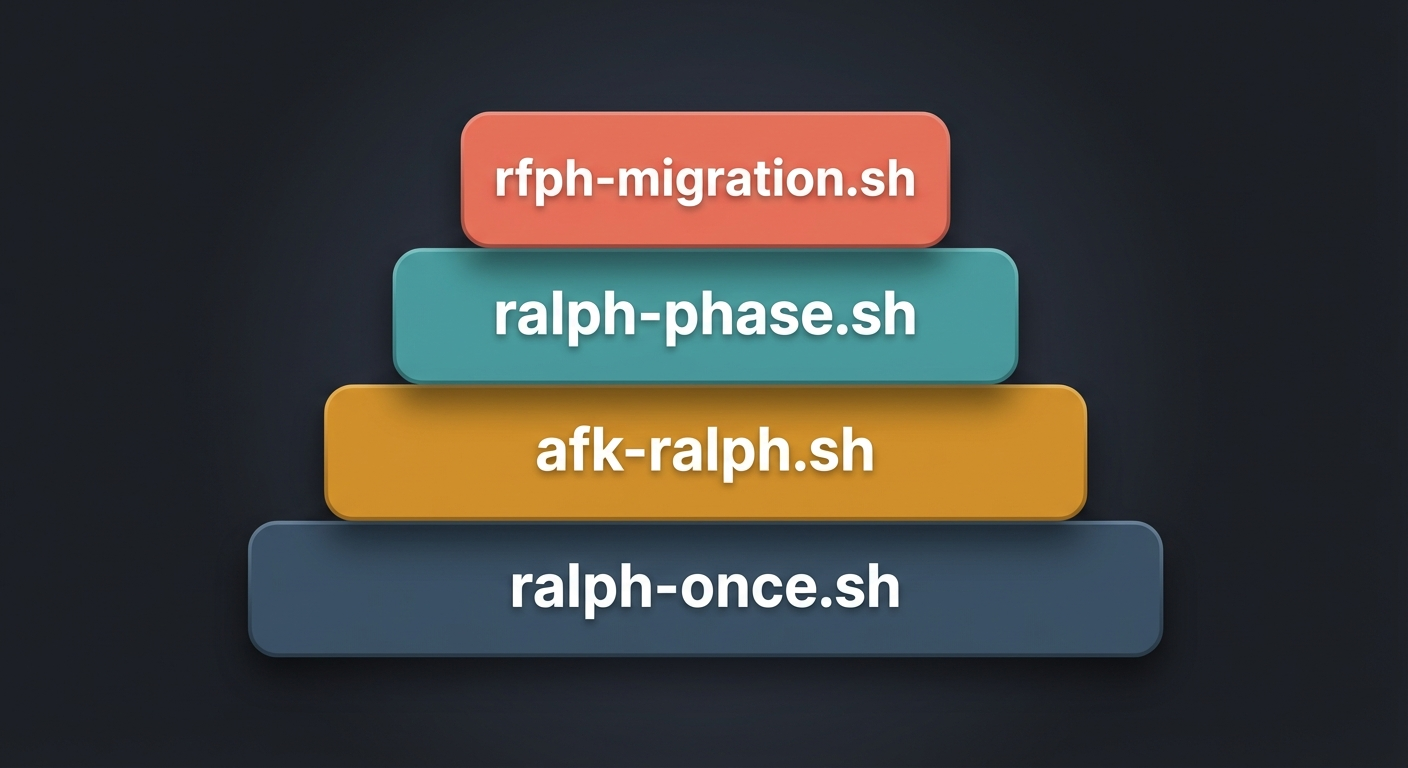
The Four Scripts
The toolkit is four scripts, each building on the last. Start simple, add complexity only when you need it. Some of the patterns here, particularly the streaming JSON output pipeline and the autonomous loop structure, were adapted from techniques shared on aihero.dev, which has solid material on running Claude Code in automation pipelines.
ralph-once.sh - One Step at a Time
The simplest version. Run it, watch Claude do one task, review the result.
#!/bin/bash

claude --permission-mode acceptEdits "@PRD.md @progress.txt \
1. Read the PRD and progress file. \
2. Find the next incomplete task and implement it. \
3. Run your tests and type checks. \
4. VISUAL VERIFICATION: If the task involved UI changes (components, pages, layouts, styles, routing): \
   a. Use mcp__claude-in-chrome__tabs_context_mcp to check for existing browser tabs. \
   b. Create a new tab with mcp__claude-in-chrome__tabs_create_mcp if needed. \
   c. Navigate to the relevant page (http://localhost:3000 for app pages, http://localhost:3000/studio for Sanity Studio). \
   d. Take a screenshot with mcp__claude-in-chrome__computer action=screenshot to verify the page renders correctly. \
   e. Check for console errors with mcp__claude-in-chrome__read_console_messages with pattern='error|Error|ERR'. \
   f. If there are visual issues or console errors, fix them before proceeding. \
   g. Note the verification result in progress.txt. \
5. Commit your changes. \
6. Update progress.txt with what you did. \
ONLY DO ONE TASK AT A TIME."
That's it. The @PRD.md and @progress.txt syntax passes those files as context to Claude Code. The --permission-mode acceptEdits flag lets it edit files without asking for confirmation on each one.
This is your starting point. Run it against a single phase PRD, watch what it does, build trust in the process. If something goes wrong, you're right there.
afk-ralph.sh - Go Get Coffee
Once you trust the single-step version, the next question is obvious: can I let it loop?
#!/bin/bash
set -e

if [ -z "$1" ]; then
  echo "Usage: $0 <iterations>"
  exit 1
fi

# jq filter to extract streaming text from assistant messages
stream_text='select(.type == "assistant").message.content[]? | select(.type == "text").text // empty | gsub("\n"; "\r\n") | . + "\r\n\n"'

# jq filter to extract final result
final_result='select(.type == "result").result // empty'

for ((i=1; i<=$1; i++)); do
  echo "=== Ralph iteration $i of $1 ==="

  tmpfile=$(mktemp)
  trap "rm -f $tmpfile" EXIT

  claude \
    --permission-mode acceptEdits \
    --verbose \
    --print \
    --output-format stream-json \
    "@PRD.md @progress.txt \
    1. Find the highest-priority incomplete task and implement it. \
    2. Run your tests and type checks. \
    3. VISUAL VERIFICATION: If the task involved UI changes (components, pages, layouts, styles, routing): \
       a. Use mcp__claude-in-chrome__tabs_context_mcp to check for existing browser tabs. \
       b. Create a new tab with mcp__claude-in-chrome__tabs_create_mcp if needed. \
       c. Navigate to the relevant page (http://localhost:3000 for app pages, http://localhost:3000/studio for Sanity Studio). \
       d. Take a screenshot with mcp__claude-in-chrome__computer action=screenshot to verify the page renders correctly. \
       e. Check for console errors with mcp__claude-in-chrome__read_console_messages with pattern='error|Error|ERR'. \
       f. If there are visual issues or console errors, fix them before proceeding. \
       g. Note the verification result in progress.txt. \
    4. Update the PRD with what was done. \
    5. Append your progress to progress.txt. \
    6. Commit your changes. \
    ONLY WORK ON A SINGLE TASK. \
    If the PRD is complete, output <promise>COMPLETE</promise>." \
  | grep --line-buffered '^{' \
  | tee "$tmpfile" \
  | jq --unbuffered -rj "$stream_text"

  result=$(jq -r "$final_result" "$tmpfile")

  if [[ "$result" == *"<promise>COMPLETE</promise>"* ]]; then
    echo "PRD complete after $i iterations."
    rm -f "$tmpfile"
    exit 0
  fi

  rm -f "$tmpfile"
done

echo "Finished $1 iterations. PRD may not be fully complete - check progress.txt."
Run ./afk-ralph.sh 15 and walk away. It loops up to 15 times, each iteration picking up the next incomplete task. When all tasks are done, the agent outputs <promise>COMPLETE</promise> and the loop exits early.
Two important additions here: streaming output (more on that below) and early completion detection. Without early exit, you'd waste iterations after the work is done.
ralph-phase.sh - Parallel Safety
Here's where it gets interesting. When you want multiple phases running simultaneously, they can't all be working in the same git checkout. ralph-phase.sh adds git worktree support so each phase gets its own isolated copy of the repo.
#!/bin/bash
set -e
unset ANTHROPIC_API_KEY

usage() {
  echo "Usage: $0 <phase-number> <iterations> [--worktree]"
  echo "Example: $0 01 10"
  echo "Example: $0 03 10 --worktree   # Run in isolated git worktree"
  exit 1
}

if [ -z "$1" ] || [ -z "$2" ]; then
  usage
fi

PHASE=$1
ITERATIONS=$2
USE_WORKTREE=false
if [ "$3" = "--worktree" ]; then
  USE_WORKTREE=true
fi

SCRIPT_DIR="$(cd "$(dirname "$0")" && pwd)"
PROJECT_ROOT="$(cd "$SCRIPT_DIR/.." && pwd)"

PRD=$(ls ${SCRIPT_DIR}/prd/phase-${PHASE}-*.md 2>/dev/null | head -1)
if [ -z "$PRD" ]; then
  echo "Error: No PRD found matching ralph/prd/phase-${PHASE}-*.md"
  exit 1
fi

WORK_DIR="$PROJECT_ROOT"
FEATURE_BRANCH=$(git -C "$PROJECT_ROOT" rev-parse --abbrev-ref HEAD)
PHASE_BRANCH="phase-${PHASE}"

if [ "$USE_WORKTREE" = true ]; then
  WORKTREE_DIR="${PROJECT_ROOT}/../.worktrees/phase-${PHASE}"

  if ! git -C "$PROJECT_ROOT" rev-parse --verify "$PHASE_BRANCH" >/dev/null 2>&1; then
    git -C "$PROJECT_ROOT" branch "$PHASE_BRANCH" "$FEATURE_BRANCH"
  fi

  if [ ! -d "$WORKTREE_DIR" ]; then
    echo "[WORKTREE] Creating worktree at $WORKTREE_DIR on branch $PHASE_BRANCH"
    git -C "$PROJECT_ROOT" worktree add "$WORKTREE_DIR" "$PHASE_BRANCH"

    echo "[WORKTREE] Installing dependencies..."
    (cd "$WORKTREE_DIR" && yarn install --frozen-lockfile 2>/dev/null || yarn install)
  else
    echo "[WORKTREE] Reusing existing worktree at $WORKTREE_DIR"
    git -C "$WORKTREE_DIR" checkout "$PHASE_BRANCH" 2>/dev/null || true
  fi

  WORK_DIR="$WORKTREE_DIR"
  PRD="ralph/prd/$(basename "$PRD")"
fi

PROGRESS="ralph/progress/phase-${PHASE}.txt"
mkdir -p "${WORK_DIR}/ralph/progress"
touch "${WORK_DIR}/${PROGRESS}"

echo "=== Ralph Phase ${PHASE} ==="
echo "PRD: ${PRD}"
echo "Progress: ${PROGRESS}"
echo "Iterations: ${ITERATIONS}"
echo "Worktree: ${USE_WORKTREE}"
echo "Working dir: ${WORK_DIR}"
echo "Branch: $(git -C "$WORK_DIR" rev-parse --abbrev-ref HEAD)"
echo ""

stream_text='select(.type == "assistant").message.content[]? | select(.type == "text").text // empty | gsub("\n"; "\r\n") | . + "\r\n\n"'
final_result='select(.type == "result").result // empty'

for ((i=1; i<=$ITERATIONS; i++)); do
  echo "--- Phase ${PHASE} | Iteration $i of $ITERATIONS ---"

  tmpfile=$(mktemp)
  trap "rm -f $tmpfile" EXIT

  (cd "$WORK_DIR" && claude \
    --permission-mode bypassPermissions \
    --verbose \
    --print \
    --output-format stream-json \
    "@${PRD} @${PROGRESS} \
    You are working on Phase ${PHASE} of a Next.js 16 + Sanity migration. \
    You are on branch: ${PHASE_BRANCH}. \
    1. Read the PRD and progress file. \
    2. Find the next incomplete task (unchecked checkbox) and implement it. \
    3. Run tests and type checks where applicable. \
    4. VISUAL VERIFICATION: If the task involved UI changes: \
       a. Use Chrome MCP tools to navigate and screenshot the page. \
       b. Check for console errors. \
       c. Fix any issues before proceeding. \
       d. Note the verification result in progress.txt. \
    5. Mark the completed task in the PRD by changing [ ] to [x]. \
    6. Append what you did to the progress file. \
    7. Commit your changes with message format: feat(phase-${PHASE}): description \
    ONLY WORK ON A SINGLE TASK. \
    If all tasks in the PRD are complete, output <promise>COMPLETE</promise>.") \
  | grep --line-buffered '^{' \
  | tee "$tmpfile" \
  | jq --unbuffered -rj "$stream_text"

  result=$(jq -r "$final_result" "$tmpfile" 2>/dev/null || echo "")

  if [[ "$result" == *"<promise>COMPLETE</promise>"* ]]; then
    echo ""
    echo "=== Phase ${PHASE} COMPLETE after $i iterations ==="
    rm -f "$tmpfile"
    exit 0
  fi

  rm -f "$tmpfile"
done

echo ""
echo "=== Phase ${PHASE} finished $ITERATIONS iterations (may not be fully complete) ==="
The --worktree flag is the key addition. When enabled, the script:
- Creates a branch named
phase-XXfrom the current feature branch - Sets up a git worktree in a sibling directory
- Installs dependencies in the worktree
- Runs Claude Code inside the worktree's directory
This means phase 03 and phase 08 can run simultaneously in separate directories, on separate branches, without stepping on each other's files. When they're done, you merge both branches back.
ralph-migration.sh - The Full Orchestra
The master orchestrator ties everything together with tmux. At ~619 lines, I won't show the whole thing, but here are the critical pieces.
The wave architecture defines the dependency graph: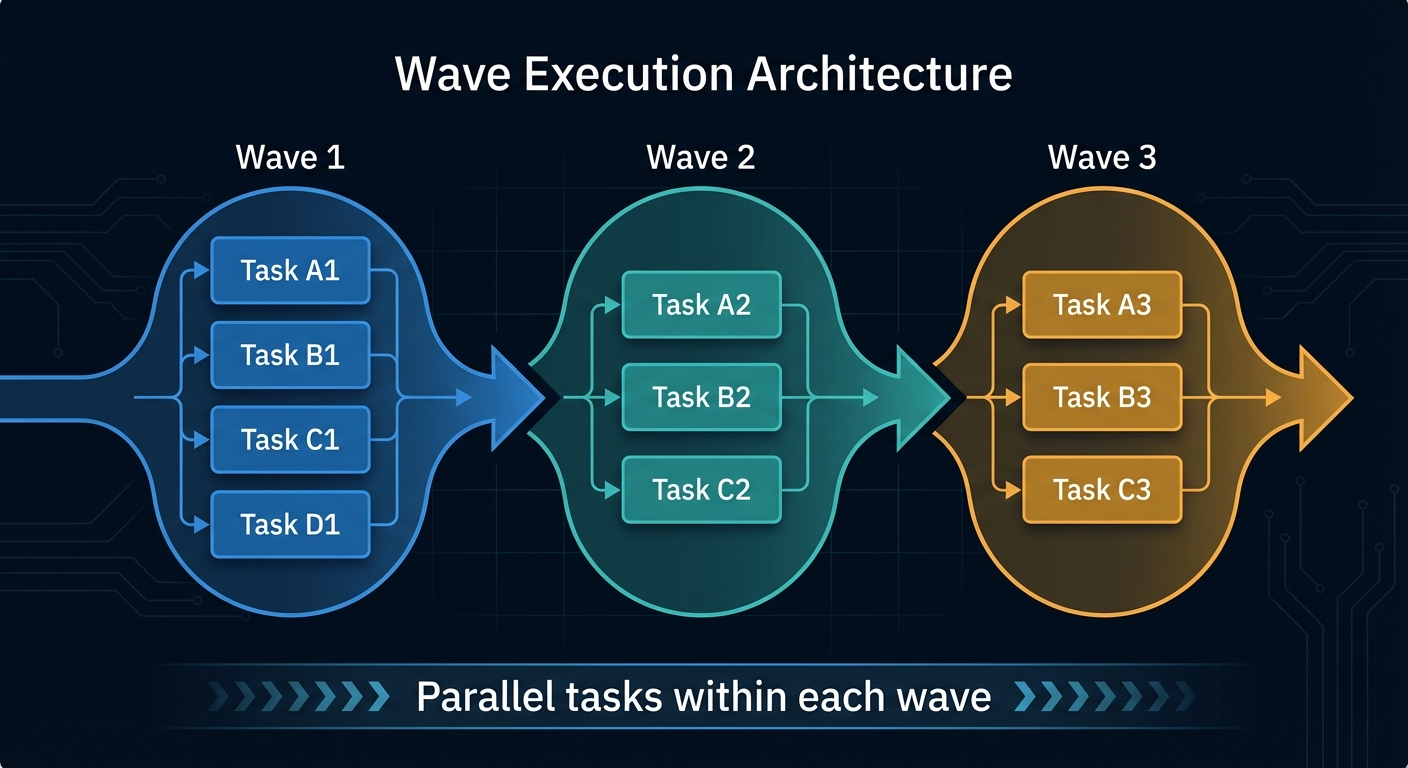
Phases within a wave run in parallel. Waves run sequentially. Wave 3 doesn't start until every phase in Wave 2 has completed and merged.
Running parallel phases in tmux panes:run_parallel_in_panes() {
local wave_name=$1
shift
local phases=("$@")
tmux new-window -t ralph -n "$wave_name"
for i in "${!phases[@]}"; do
local phase="${phases[$i]}"
if [ $i -gt 0 ]; then
tmux split-window -t "ralph:${wave_name}" -h
tmux select-layout -t "ralph:${wave_name}" tiled
fi
tmux send-keys -t "ralph:${wave_name}.$i" \
"$(pane_command "$phase")" C-m
done
}This creates a tmux window, splits it into however many panes you need, and launches ralph-phase.sh --worktree in each one. The tiled layout gives each pane equal space.
wait_for_wave() {
  local phases=("$@")
  local all_done=false

  while [ "$all_done" = false ]; do
    all_done=true
    for phase in "${phases[@]}"; do
      if [ ! -f "ralph/progress/phase-${phase}.done" ]; then
        all_done=false
        break
      fi
    done
    sleep 10
  done
}
Simple polling. Each phase writes a .done file when it finishes. The orchestrator checks every 10 seconds until all phases in the wave have reported completion.
merge_wave() {
  local phases=("$@")
  local current_branch=$(git rev-parse --abbrev-ref HEAD)

  for phase in "${phases[@]}"; do
    local phase_branch="phase-${phase}"
    echo "[MERGE] Merging ${phase_branch} into ${current_branch}"
    git merge "${phase_branch}" --no-edit
    git worktree remove "../.worktrees/phase-${phase}" 2>/dev/null || true
    git branch -d "${phase_branch}" 2>/dev/null || true
  done
}
After all phases in a wave complete, merge each phase branch back into the main feature branch, clean up the worktree, and delete the branch. Then the next wave starts from the merged state.
The Streaming Trick
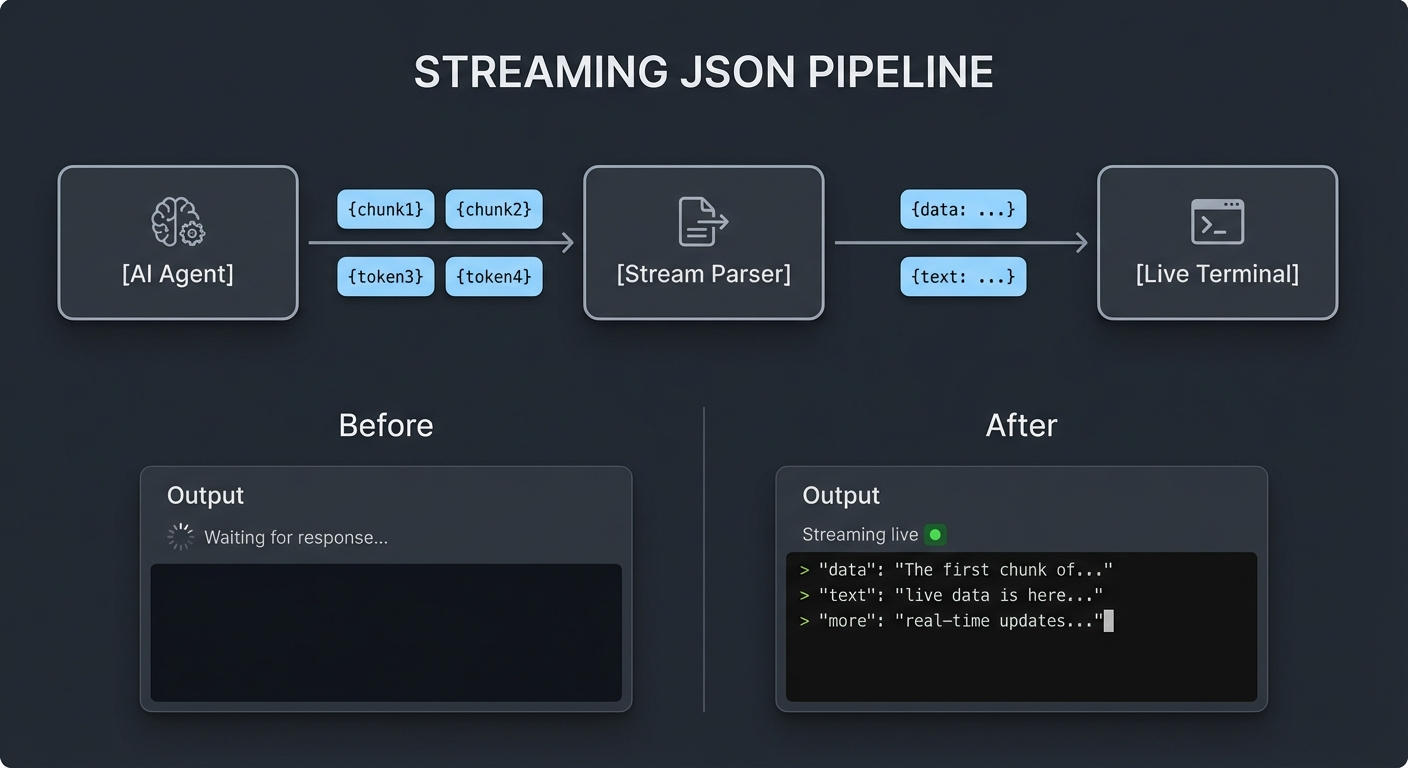
This is the detail that makes the whole thing usable. Without it, you'd stare at a blank terminal for 5-10 minutes per iteration while Claude works. I picked up this technique from aihero.dev, which has excellent material on running Claude Code in automation pipelines.
Claude Code's --output-format stream-json flag emits one JSON object per line as things happen. The pipeline looks like this:
claude --output-format stream-json ... \
  | grep --line-buffered '^{' \
  | tee "$tmpfile" \
  | jq --unbuffered -rj "$stream_text"
Breaking this down:
claude --output-format stream-jsonemits JSON objects in real timegrep --line-buffered '^{'filters to only JSON lines (skipping any non-JSON output), with line buffering to prevent grep from holding datatee "$tmpfile"saves everything to a temp file so we can extract the final result laterjq --unbuffered -rj "$stream_text"extracts and prints just the text content from assistant messages
The $stream_text jq filter does the heavy lifting:
stream_text='select(.type == "assistant").message.content[]? | select(.type == "text").text // empty | gsub("\n"; "\r\n") | . + "\r\n\n"'It selects assistant messages, extracts the text content, fixes newlines for terminal display, and adds spacing between chunks. The --unbuffered and -r (raw) and -j (no trailing newline) flags on jq ensure text appears immediately without extra formatting.
For the final result, after the loop iteration completes:
final_result='select(.type == "result").result // empty'
result=$(jq -r "$final_result" "$tmpfile")
This reads the saved temp file and extracts the result field from the final JSON object. If it contains <promise>COMPLETE</promise>, we know the PRD is done and can exit the loop early.
The difference this makes is night and day. Without streaming, you see nothing for minutes. With streaming, you see Claude's reasoning, its tool calls, its commit messages, all in real time. You can spot problems early instead of discovering them after the iteration finishes.
Waves and Worktrees
The wave architecture is the core scheduling concept. Each wave is a group of phases that can safely run in parallel because they don't modify the same files.
Wave 1 runs sequentially because phase 02 depends on phase 01's output. Within Wave 3, nine phases run simultaneously because they touch different parts of the codebase: different blocks, different features, different config files.
Git worktrees are what make parallel execution safe. A worktree is a second (or third, or ninth) checkout of the same repository in a different directory. Each worktree has its own working tree and branch, but they share the same .git directory.
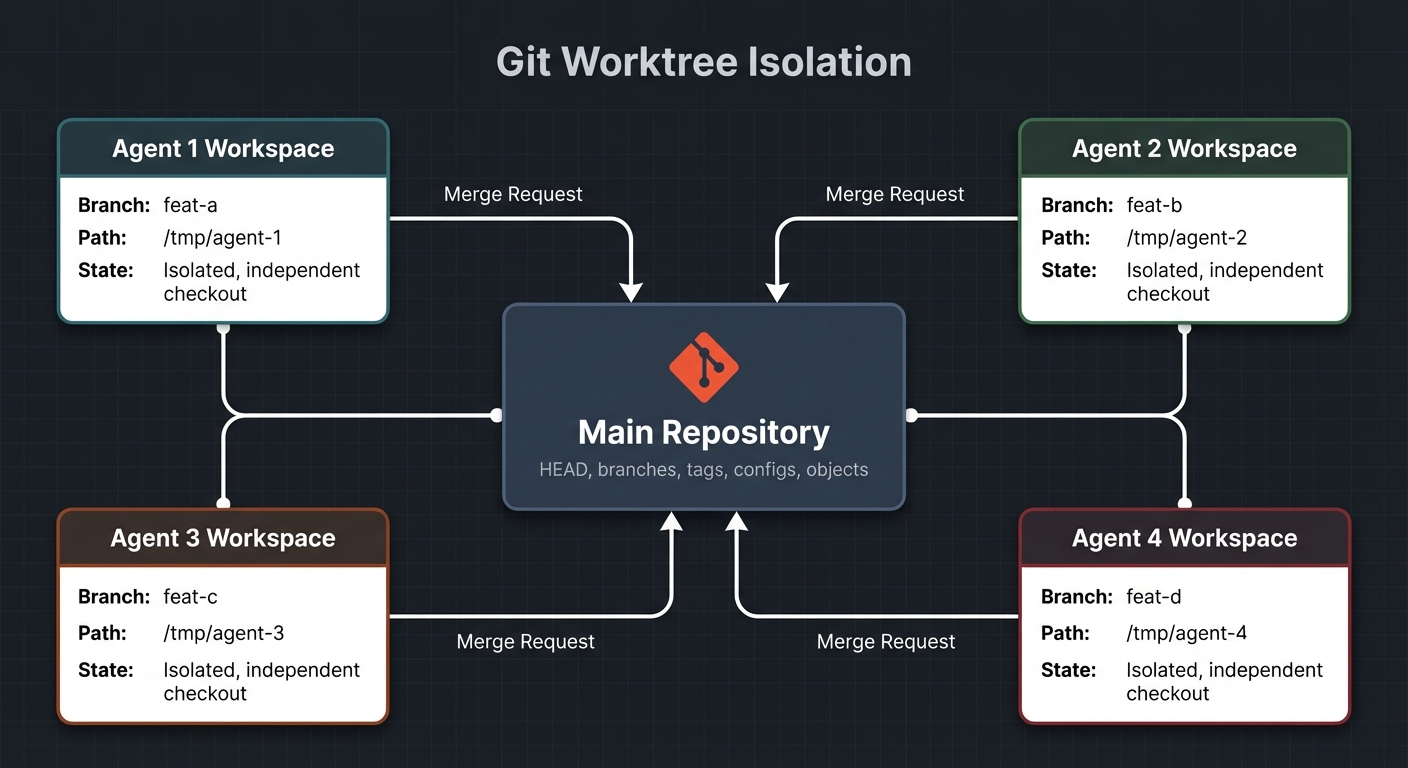
# Creates a new checkout at the specified path on its own branch
git worktree add "../.worktrees/phase-03" phase-03
Now phase 03 runs in ../.worktrees/phase-03/ and phase 08 runs in ../.worktrees/phase-08/. They can both edit files, run builds, and commit without conflicts. When they're done, you merge both branches back sequentially.
The main risk with worktrees is disk space. Each worktree needs its own node_modules, so you're looking at roughly 2GB per worktree. Wave 3 with nine parallel phases means ~18GB of disk space just for dependencies. I ran yarn install in each worktree as part of setup, which added time but ensured each phase had a clean, working environment.
After each wave merges, the worktrees get cleaned up:
git worktree remove "../.worktrees/phase-03"
git branch -d phase-03
This recovers disk space before the next wave starts.
PRD as State Machine
The PRD format is deliberately simple. Each phase gets a markdown file with checkbox tasks:
# Phase 1: Sanity Codemod & Dependencies

## Tasks

- [x] Run `npx @sanity/cli codemod deskRename` to update imports
- [x] Rename directory `studio/desk/` -> `studio/structure/`
- [x] Update all imports referencing `studio/desk/`
- [x] Update Sanity API version
- [x] Install `next-sanity` v11+
- [x] Verify Studio still builds
- [x] Commit changes
The agent's job is simple:
- Read the PRD
- Find the first
[ ](unchecked task) - Implement it
- Change
[ ]to[x] - Commit
- Repeat
┌─────────────┐    ┌──────────────┐    ┌─────────────┐    ┌──────────────┐    ┌────────────┐
│  Read PRD   │───▶│  Find [ ]    │───▶│  Implement   │───▶│  Mark [x]    │───▶│   Commit    │
│             │    │  next task   │    │  the task    │    │  in PRD      │    │  changes   │
└─────────────┘    └──────────────┘    └─────────────┘    └──────────────┘    └─────┬──────┘
       ▲                                                                           │
       └───────────────────────── next iteration ──────────────────────────────────┘
This is a state machine where the PRD itself is the state. If the agent crashes mid-iteration, the state is preserved in the file. The next iteration picks up exactly where it left off. No database, no job queue, no external state management.
The constraint ONLY WORK ON A SINGLE TASK is critical. Without it, Claude tends to get ambitious and try to tackle multiple tasks at once, which makes progress tracking unreliable and failures harder to debug. One task, one commit, one checkbox. Always.
Early completion detection uses a sentinel value:
If the PRD is complete, output <promise>COMPLETE</promise>.The wrapping script checks for this in the output and exits the loop:
if [[ "$result" == *"<promise>COMPLETE</promise>"* ]]; then
    echo "PRD complete after $i iterations."
    exit 0
fi
I chose <promise>COMPLETE</promise> as the sentinel because it's distinctive enough that it won't appear in normal output. A bare "COMPLETE" could match log messages or commit descriptions. The XML-like tags make false positives effectively impossible.
Visual Verification
Type checking and tests catch a lot, but they don't catch everything. A component can pass TypeScript and still render as a blank white page. That's why the prompt includes visual verification steps using Chrome MCP tools.
The verification flow in the prompt:
UI task completed
        │
        ▼
  ┌─────────────────┐     ┌──────────────────┐
  │  Open Chrome     │────▶│  Navigate to page │
  │  (MCP tools)     │     │  localhost:3000   │
  └─────────────────┘     └────────┬─────────┘
                                   │
                                   ▼
                          ┌────────────────┐
                          │  Screenshot    │
                          │  the page      │
                          └───────┬────────┘
                                  │
                    ┌─────────────┴─────────────┐
                    ▼                           ▼
           ┌──────────────┐            ┌──────────────┐
           │  Check for    │            │  Visual      │
           │  console errs │            │  inspection  │
           └──────┬───────┘            └──────┬───────┘
                  │                           │
                  └─────────┬─────────────────┘
                            ▼
                   ┌─────────────────┐     Yes    ┌─────────────┐
                   │  Issues found?  │───────────▶│  Fix & retry │
                   └────────┬────────┘            └─────────────┘
                            │ No
                            ▼
                   ┌─────────────────┐
                   │  Mark complete  │
                   │  Log result     │
                   └─────────────────┘
4. VISUAL VERIFICATION: If the task involved UI changes:
a. Use mcp__claude-in-chrome__tabs_context_mcp to check for existing browser tabs.
b. Create a new tab with mcp__claude-in-chrome__tabs_create_mcp if needed.
c. Navigate to the relevant page (http://localhost:3000 for app pages,
http://localhost:3000/studio for Sanity Studio).
d. Take a screenshot with mcp__claude-in-chrome__computer action=screenshot
to verify the page renders correctly.
e. Check for console errors with mcp__claude-in-chrome__read_console_messages
with pattern='error|Error|ERR'.
f. If there are visual issues or console errors, fix them before proceeding.
g. Note the verification result in progress.txt.Claude Code uses the Chrome MCP extension to control a real browser. It navigates to the page, takes a screenshot, and looks at it. It reads console errors. If something's wrong, it fixes the code and re-checks before marking the task complete.
This caught real issues during the migration. Components that compiled but had broken imports. Pages that rendered but threw hydration errors in the console. Layout components that rendered children in the wrong order. None of these would have been caught by tsc alone.
The trade-off is speed. Visual verification adds 30-60 seconds per task. For a migration with hundreds of tasks, that adds up. I only enabled it for tasks involving UI changes. Pure config changes, dependency updates, and type fixes skip verification.
The Results
The migration ran across three days:
- January 26: 1 commit. Setup, planning, writing PRDs.
- January 27: 205 commits. The big day. Most waves ran here.
- January 28: 35 commits. Cleanup, fixes, final verification.
+12,003
insertions
-5,142
deletions
236
files changed
271
commits
Full breakdown:
| Metric | Value |
|---|---|
| Phase PRDs written | 28 |
| Waves of execution | 14 |
| Max simultaneous agents | 9 |
| Total commits | 271 |
| Files changed | 236 |
| Insertions | 12,003 |
| Deletions | 5,142 |
| Phases completed | 25 of 28 |
The actual migration work, 14 waves, happened mostly on a single day. The first day was planning and the last day was cleanup. The middle day was Ralph Wiggum doing its thing while I occasionally checked tmux to make sure nothing was on fire.
Adapting This for Your Project
The toolkit doesn't care what you're migrating. It works with any project where you can decompose the work into numbered phases with checkbox tasks. Here's how to adapt it:
Step 1: Write your migration plan. List everything that needs to change. Group related changes together. Each group becomes a phase.
Step 2: Create numbered phase PRDs. Put them in a directory like ralph/prd/. Name them phase-01-description.md, phase-02-description.md, etc. Use checkbox format:
# Phase 3: Upgrade Authentication

## Tasks

- [ ] Update passport.js to v0.7
- [ ] Migrate session config to new format
- [ ] Update all auth middleware
- [ ] Run auth integration tests
- [ ] Commit changes
Step 3: Analyze dependencies. Which phases must complete before others can start? Draw the graph. Group independent phases into waves.
Step 4: Start with ralph-once.sh. Point it at your first phase. Watch it work. Verify the results. Build confidence.
Step 5: Graduate to afk-ralph.sh. Run it with a generous iteration count. ./afk-ralph.sh 20 gives the agent up to 20 attempts to complete the phase. Most phases finish in 5-10 iterations.
Step 6: Use ralph-phase.sh --worktree for parallel phases. In separate terminal tabs, run ./ralph-phase.sh 03 15 --worktree and ./ralph-phase.sh 08 15 --worktree. They'll work in isolated worktrees.
Step 7: Customize ralph-migration.sh. Edit the wave definitions to match your dependency graph. The helper functions (run_parallel_in_panes, wait_for_wave, merge_wave) don't need changes. Just update which phases go in which waves.
Step 8: Run the full orchestration. Launch it in tmux and watch the panes tile across your screen. Go make dinner. Come back to a migrated codebase.
What I'd Do Differently
This worked, but it wasn't perfect. A few lessons from running it:
More granular phases. Some phases had 15+ tasks and took too many iterations. Phases with 5-8 tasks completed more reliably. When a phase is too large, the agent loses context toward the end and starts making mistakes.
Better dependency analysis upfront. I discovered implicit dependencies mid-migration. Phase 09 assumed a utility function that phase 04 hadn't created yet. Spending more time mapping file-level dependencies between phases would have prevented several mid-wave failures.
Pre-warm node_modules cache. Each worktree runs yarn install, and with nine parallel phases, that's nine simultaneous downloads. Pre-caching the dependency tree before launching parallel waves would save time and reduce the chance of network-related failures.
Monitor disk space more aggressively. Nine worktrees with node_modules ate through disk space fast. I hit a disk space warning during Wave 3 and had to manually clean up old worktrees before continuing. An automated check between waves would have caught this earlier.
Shorter iteration timeouts. Some iterations got stuck in a loop trying to fix a type error that required a different approach. Adding a per-iteration timeout (say, 10 minutes) and moving to the next iteration would have been more efficient than waiting for the agent to exhaust its context window.
Closing
Ralph Wiggum is four bash scripts, two jq filters, and a tmux session. There's no framework, no database, no job queue. The state lives in markdown files with checkboxes. The isolation comes from git worktrees. The orchestration comes from tmux panes and done-file polling.
The key insight is that AI agents are good at focused, single-task execution but bad at long-running, multi-phase coordination. They lose context over time. They get confused by large scopes. They can't track their own progress across session boundaries.
Ralph Wiggum bridges that gap. It keeps each agent focused on one checkbox at a time. It manages the state externally in files the agent can read but the script controls. It handles parallelism through git worktrees so agents can't step on each other. And it streams the output so you can watch what's happening instead of staring at a blank screen.
The scripts are generic. Swap out the PRDs and the prompt, and you can orchestrate any multi-phase project. Database migration. API version upgrade. Monorepo restructuring. Design system rollout. If you can write it as a checklist, Ralph can run it.
I also build AI workflow automation for businesses. Same orchestration principles, applied to your admin, pipeline, content, and strategy. Scoped to your workflows.
Explore the Full Code
Star the repo to stay updated
Let's Connect
Follow for more smart home content
Follow on Twitter/X
@danmalone_mawla
Tags
claude-code
ai-development
automation
bash
git-worktrees
tmux

Related Articles
Continue reading similar content
6 Releases in 3 Days: What Happens When You Ship (Part 5)
Part 5 of my Home Assistant AI journey: I promised to build auto-create automations. Instead, I shipped 6 releases in 3 days - none of which were the feature I said I'd build.
7 min read
Turning a Script Into a Home Assistant Integration (Part 4)
Part 4 of my Home Assistant AI journey: How I turned the automation-finder Python script into a proper HA integration with config flow, sensors, and services.
10 min read
Finding Automation Candidates in Your Home Assistant Logbook (Part 3)
Part 3 of my Home Assistant AI journey: Using Python to mine your logbook for manual actions that should be automated.
8 min read