Loading...
Back to Blog
Back to Blog Dan Malone
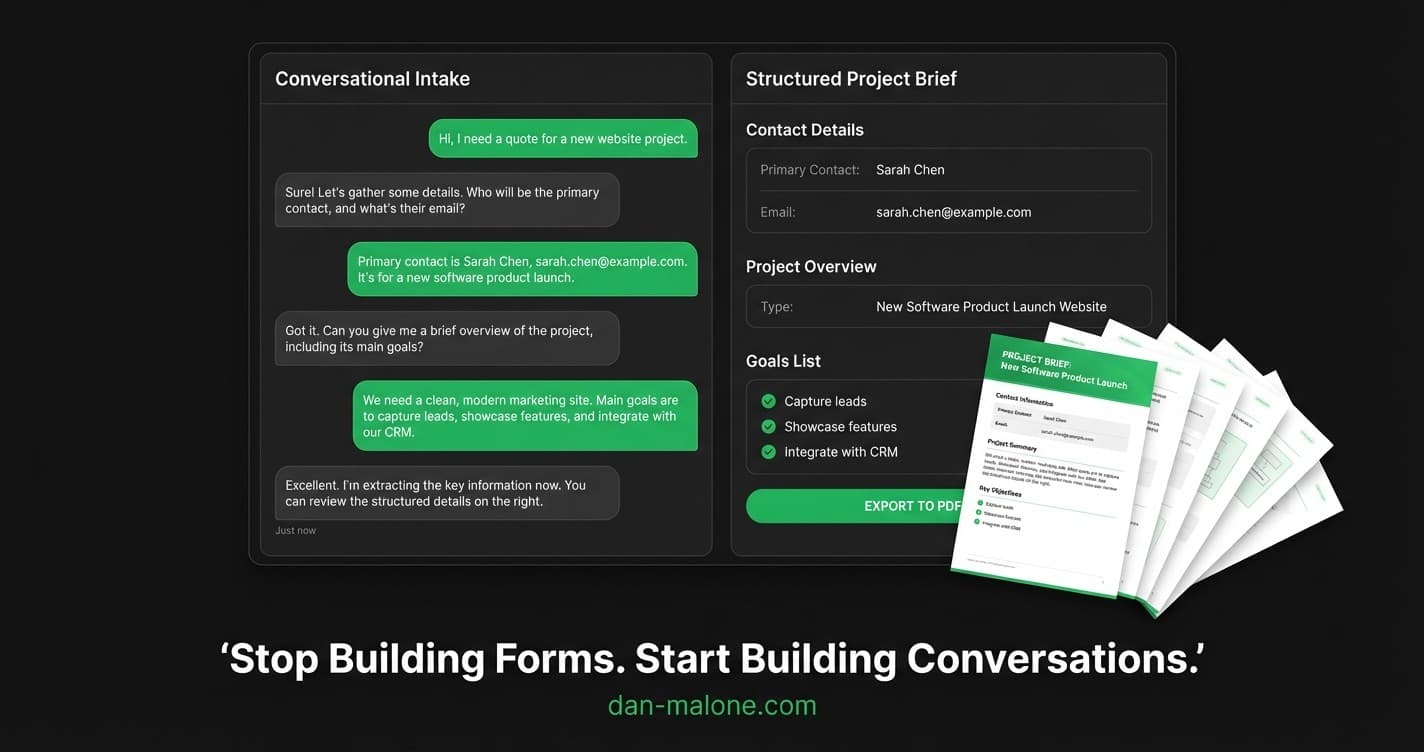
Stop Building Forms. Start Building Conversations.
Dan MaloneFebruary 17, 2026
10 min read
Share this article
TL;DR
I replaced my lead capture form with an AI conversation. You chat naturally about your project, the AI extracts structured data in real time, and you walk away with a 12-page branded PDF brief. No forms. No wizards. Just a conversation.
Stop Building Forms. Start Building Conversations.
Forms are the worst thing we collectively agreed to keep building.
Not because they don't work. They collect data fine. The problem is what they do to the person filling them out. A contact form says: "Here are 15 things I need from you. Figure it out. Fill in the boxes. Hope you picked the right dropdown."
Nobody has ever enjoyed filling in a form. Nobody has ever left a multi-step wizard thinking, "Wow, that really helped me clarify my project." Forms help the business and burden the user. They're a data collection mechanism pretending to be an experience.
So I didn't build one. I built a conversation instead.
Why Conversations Beat Forms
Here's what conversations are good at that forms aren't: helping people think.
Most leads don't show up with a perfectly structured project brief in their head. They show up with "I need a website" or "We want to rebuild our app" or "I have this idea for Uber but for cats." They need to talk it through. They need someone to ask the right follow-up questions. They need to feel like they're being heard, not processed.
A form can't do that. A form says "pick a budget range" to someone who doesn't know what things cost. A conversation says "tell me about the project and I'll help you figure out what's realistic."
What AI-Native Actually Means
I want to be precise about the term "AI-native" because it gets thrown around loosely.
AI-native does not mean: slap a chatbot on your existing form. AI-native means: redesign the entire experience around what AI is actually good at.| Traditional Pattern | AI-Native Pattern |
|---|---|
| User fills structured fields | AI extracts structure from conversation |
| Validation errors after submission | Real-time data extraction as you talk |
| Static form, same for everyone | Dynamic conversation, adapts to context |
| User must know the taxonomy | AI maps their words to your categories |
| Output: form submission | Output: synthesized document |
How the Flow Works
Here's what the contact page looks like now.
Step 1: Chat + Empty Brief
You land on the page and get a conversation alongside an empty brief panel. No form fields to fill out. No steps indicator. Just a chat interface on the left and a brief panel on the right with blank fields waiting to be populated. Cloudflare Turnstile handles bot protection silently in the background before your first message.
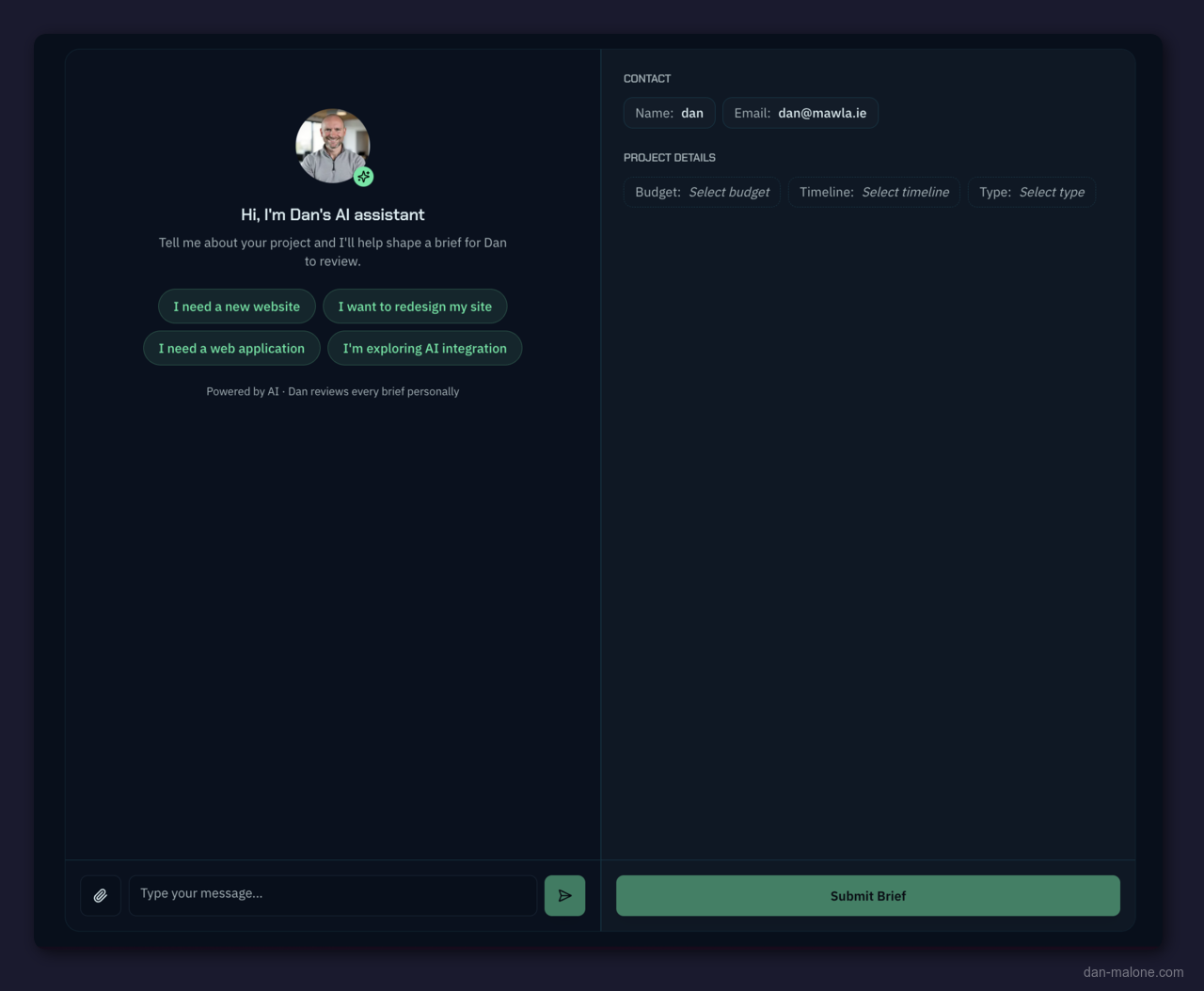
The AI greets you and asks what you're looking for. You type naturally: "I want to build an on-demand app for cat transportation" or "We need someone to rebuild our legacy Rails app" or "I'm not even sure what I need yet."
Step 2: The Brief Fills Itself In
As you chat, the AI starts extracting structured data through tool calls. Name? Got it. Email? Noted. Budget range discussed? Captured. Behind the scenes, Claude is calling tools like updateContact(), updateQualification(), and updateBrief() to populate the brief panel in real time.
The empty fields you saw on arrival start filling in as the conversation progresses. Contact details appear, a project overview takes shape, goals and requirements materialize - all extracted from what you're saying, not from anything you typed into a form.
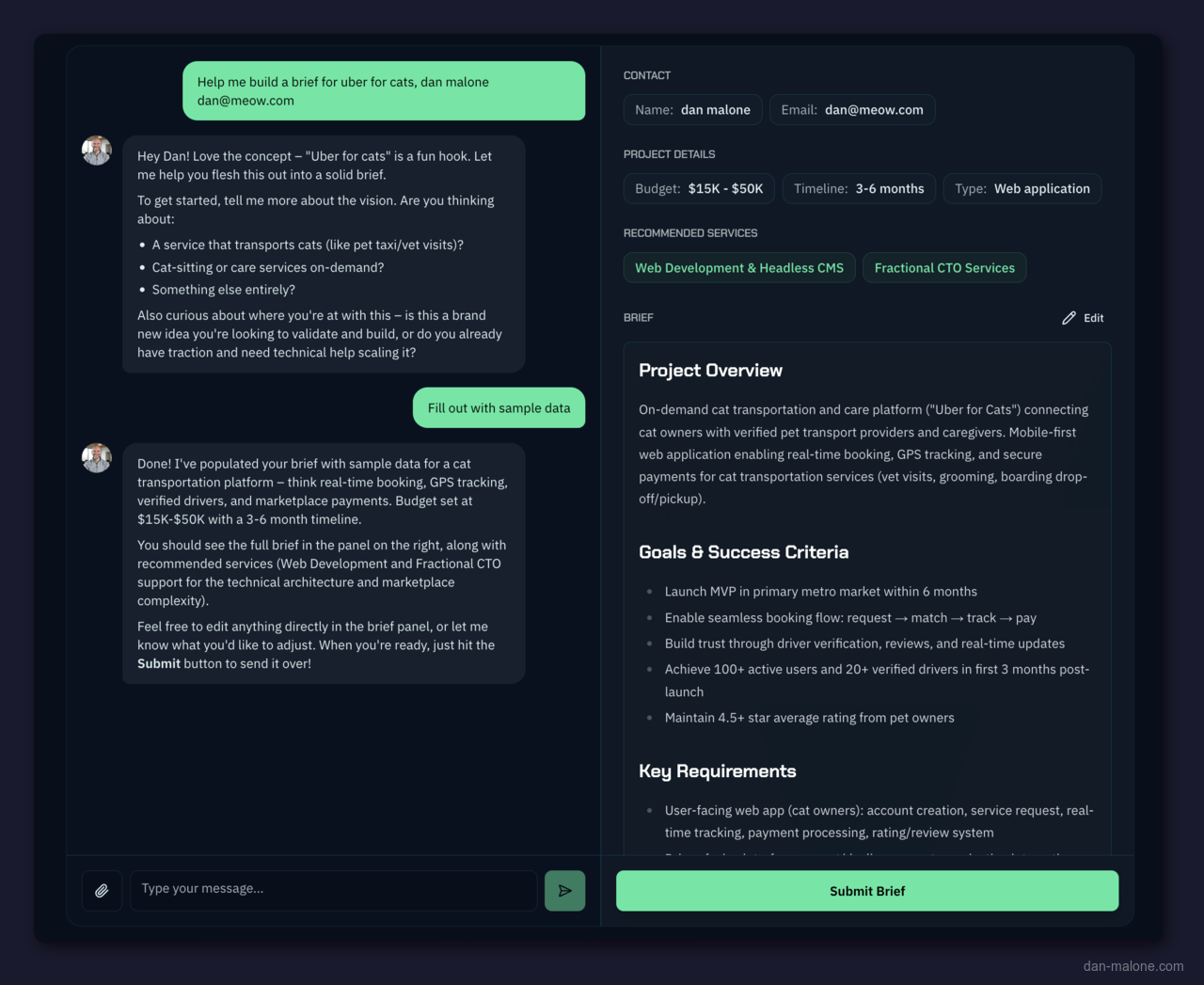
On desktop, it's a 50:50 split. Chat on the left, your brief on the right. On mobile, the chat stays primary with a floating toggle button to peek at the brief.
The brief is always editable. Don't like how the AI categorized your budget? Click it and change it. It's your brief.
Step 3: Conversation Deepens
The AI isn't just collecting fields. It's helping you think through the project. It asks about success criteria. Suggests technical considerations you might not have thought of. Breaks down requirements into categories.
Upload a document - an existing brief, an RFP, a competitor analysis - and the AI extracts relevant information to enrich what you've already discussed.
There's a 25-message limit, which turns out to be plenty. Most conversations produce a complete brief in 10-15 messages.
Step 4: The Brief
At the end, the AI calls updateRecommendedServices() to suggest relevant service offerings based on what you discussed. You get a downloadable PDF. Not a summary. Not a form printout. A proper branded document.
The Output: A 12-Page Brief from a Chat
This is the part that changes people's minds about the approach.
Someone chatted about building "Uber for Cats" - an on-demand web app connecting cat owners with vetted pet transportation providers. A playful conversation, maybe 12 messages. Here's what the PDF contained:
| Section | What's In It |
|---|---|
| Cover Page | Logo, project type, date, key metrics bar |
| Contact & Project Details | Structured grid: name, email, company, role, budget ($15k-$50k), timeline (3-6 months), type (web-app) |
| Project Brief | Detailed overview, 6 success criteria, requirements split by Cat Owners / Service Providers / Admin Dashboard |
| Technical Considerations | Platform (PWA), real-time features, payments (Stripe), mapping (Google Maps API), background checks, scalability, GDPR |
| Timeline & Milestones | Month-by-month plan: Discovery, MVP, Testing, Launch |
| Budget & Priorities | Three tiers: Must-have MVP / Important but phaseable / Nice-to-have |
| Additional Notes | AI-generated strategic advice: market validation, partnership approach, regulatory considerations |
| Recommended Services | 3 tailored service cards with descriptions and feature bullets |
| Why Dan Malone | Experience grid: Startup Founder & CTO, Agency Owner (8 years), Team Leadership (30 people), Revenue & Operations (EUR750K) |
| Case Studies | 6 relevant case studies with challenge/solution/results and testimonials |
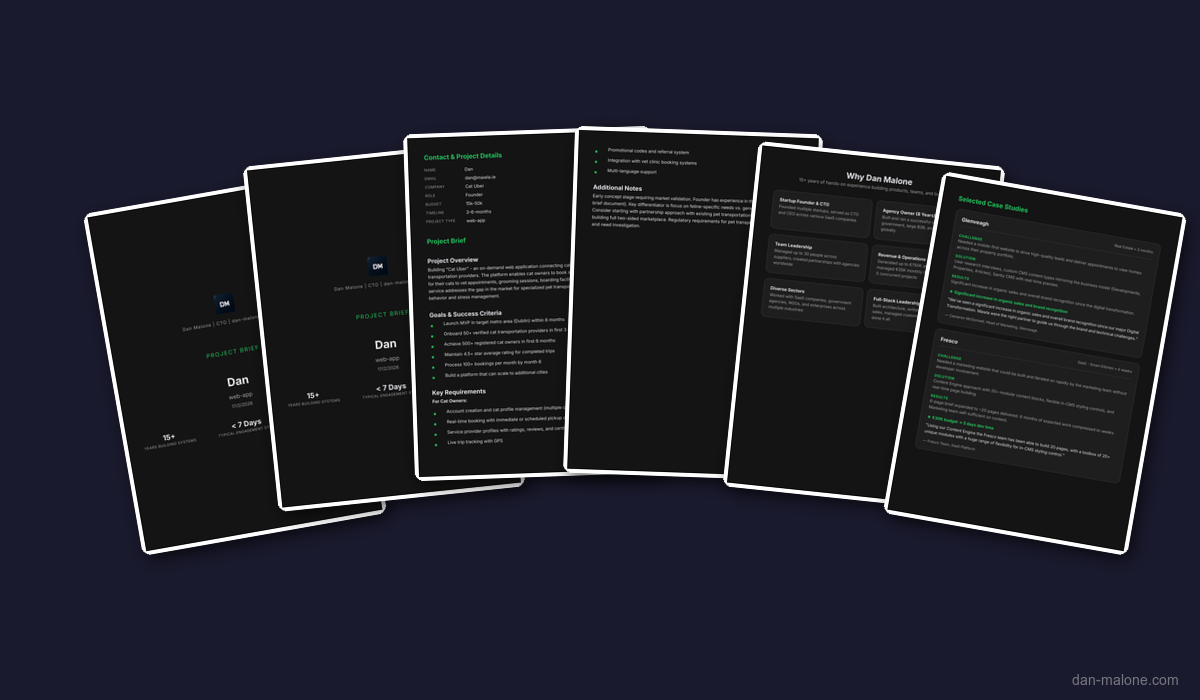
The brief includes case studies, testimonials, and recommended services generated via react-pdf on Vercel serverless. It's a document you'd actually send to your team or your boss to justify the project.
A casual conversation produced a document that would take a human consultant hours to write. That's the AI-native payoff.
Instant Delivery, Both Sides
When someone hits submit, two emails fire simultaneously via Resend:
- To the lead: The full brief rendered inline in the email body, the PDF attached, and a download link to a hosted copy on Vercel Blob Storage. Three ways to access their brief.
- To me: A notification with structured contact details and the complete brief.
The lead gets immediate value in their inbox. No "thanks, we'll be in touch" emptiness. They get their actual brief back - the thing the conversation just helped them build - before they've even closed the tab.
The Tech
High-level stack for anyone who wants to build something similar:
| Layer | Tech |
|---|---|
| Framework | Next.js |
| AI | Vercel AI SDK v6 with tool calls |
| Model | Claude |
| react-pdf on Vercel serverless | |
| CRM | Notion API (pages created automatically) |
| Resend for notifications | |
| Bot Protection | Cloudflare Turnstile |
| Validation | Zod schemas throughout |
When someone finishes a conversation, three things happen simultaneously: the PDF generates, a Notion page appears in my CRM with the full brief, and Resend fires off a notification email. The lead gets the PDF. I get the context. No manual data entry anywhere.
Why Both Sides Win
Most lead capture optimizations focus on one side: conversion rate for the business, or simplicity for the user. This approach does both, and that's not an accident.
What the lead gets:- Help articulating their project (most valuable part)
- A shareable PDF they can send to stakeholders
- Recommended services tailored to their specific needs
- Strategic advice they didn't ask for but probably needed
- Zero form fields to fill out
- Qualified leads with rich context, not just name/email/message
- A structured brief I can actually scope and price from
- Automatic CRM entry with full conversation context
- Less back-and-forth before the first call
- Leads that have already thought through their project
This isn't a prototype sitting on a staging server. It's been live on dan-malone.com/contact for the past week, and it's already generating real leads from people with actual projects. The quality of inbound has been noticeably higher - leads arrive pre-qualified with a clear brief, and the first call is about scoping, not discovery.
The Pattern Beyond Lead Capture
This isn't just a lead capture trick. It's a design pattern.
Every structured intake is a conversation waiting to happen:
| Traditional Form | AI-Native Replacement |
|---|---|
| Support ticket submission | Conversation that diagnoses the issue while filing the ticket |
| Employee onboarding forms | Chat that collects info and answers questions simultaneously |
| Patient intake paperwork | Conversation that builds the medical history naturally |
| Insurance claim forms | Chat that extracts claim details and explains the process |
| Survey / feedback forms | Dialogue that goes deeper on interesting responses |
The structured data still gets created. You still get your database rows and your PDF reports and your CRM entries. But the human never has to think in terms of your data model. They think in terms of their problem. The AI bridges the gap.
What I'd Build Next
Three things are on my mind for where this goes:
Returning visitors. If someone comes back, the AI should remember the previous conversation. "Hey, last time you were thinking about the cat transportation app. Did you end up validating the market?" That's a CRM feature disguised as a conversation.
Multi-party briefs. Right now it's one person, one conversation. But projects have stakeholders. Imagine sharing a brief link where a CTO and a product manager each add their perspective through separate conversations, and the AI synthesizes both into one document.
Voice input. The chat interface assumes typing. But the people most likely to benefit from conversational intake are the ones who'd rather just talk. Plugging in speech-to-text would make this accessible to an entirely different user base.
The Bottom Line: Every form on the internet is a design compromise - forcing humans to think like databases so computers can process their input. AI removes that compromise entirely. The conversation is the form. The brief writes itself. Start with what AI does well, not what HTML gives you for free.
Explore the Full Code
Star the repo to stay updated
Let's Connect
Follow for more smart home content
Follow on Twitter/X
@danmalone_mawla
Tags
ai
ai-native
lead-generation
ux-design
next-js
vercel-ai-sdk

Related Articles
Continue reading similar content

AI Agents Built My Game in Godot, Then Ported It to Unity. Here's What I Learned
I'm building Crush Depth, a deep-sea salvage game, and AI agents write all of the code. It started in Godot 4.7, and this week the full port to Unity 6.7 got under way. Here's how I picked the engine, the numbers behind the call, and what made the agents useful.
7 min read

I Replaced CleanShot X With a Free Screenshot App I Built in One Session
A free, open-source screenshot app for the Mac. I take screenshots all day, and that meant CleanShot X. This week I replaced it with FreeShot, which I built in one session with Claude Code. Here's what it took, what it cost and what I gave up.
5 min read

How to Make a SaaS Feel Alive: Intercom Lifecycle Messaging, Built with Claude
Most SaaS treats a new user like a transaction — a sign-up confirmation, then silence. Lifecycle messaging is how you make the product feel alive instead. Here's how I built a full system in Intercom — 37 outbound messages wired into four Series — by pointing Claude at Intercom's own internal API, plus the one rule most teams get wrong.
13 min read