Loading...

Back to Blog
Back to Blog Dan Malone
How to Make a SaaS Feel Alive: Intercom Lifecycle Messaging, Built with Claude
Dan MaloneJune 9, 2026
13 min read
Share this article
TL;DR
Most SaaS treats a new signup like a transaction — a confirmation email, then silence. Lifecycle messaging is how you make the product feel alive: the right nudge to the right person at the right moment, and it stops the second they succeed. I built a full system in Intercom — 37 outbound messages wired into four Series — by pointing Claude at Intercom's internal API, because the public one can't create any of it. Here's the strategy, the one rule most teams get wrong, and the recipe to build it yourself.
How to Make a SaaS Feel Alive: Intercom Lifecycle Messaging, Built with Claude
Here's how most software treats you when you sign up: a confirmation email, and then nothing. You're in. Good luck. The product just sits there waiting for you to figure it out on your own — and most people don't. They poke around an empty account once and never come back.
Lifecycle messaging is the fix. It's the difference between a product that feels dead — a form you filled in once — and one that feels alive: something that notices where you are, says the one thing that'll actually help, and then gets out of your way. Done well, it's the closest thing a SaaS has to a good onboarding human sitting next to you.
I just built one end to end for OG1, a professional network for sports coaches. The product had the classic problem: people signed up and stalled with half-finished profiles — which is fatal when the profile is the product. So we wired up a full lifecycle system in Intercom: dozens of individual messages, connected into four journeys, one for each stage of a user's life on the platform.
Two things made it worth writing about. One, the product lessons — chiefly the rule nearly everyone gets wrong, which is knowing when to stop. Two, how I actually built it: I pointed Claude at Intercom's own internal API and let it do the heavy lifting, because Intercom's public API flatly can't create any of this. Both are below — plus the recipe, so you can do it yourself or know what you're paying for if you don't.
🎯 A sign-up is not an activation
The temptation, when people aren't sticking, is to reach for a weekly email blast. Upload everyone, drip them a newsletter, hope a few come back. We did a version of that first as a stopgap — one "we miss you, come log in" send to the whole list. Fine as a one-off. Useless as a system.
Because the thing about real users is that
everyone is in a different place. One person needs to add a bio. Another has a great profile but has never followed a single person. A third was active for a week and vanished. Blast them all the same email and you're wrong for nearly everyone — nagging the people who already did the thing, and saying nothing useful to the people who didn't.
What you actually want is a system that knows where each person is and says the one right thing to move them forward. That's lifecycle messaging.
A product that messages everyone the same thing feels like a mailing list. A product that messages you based on what you've actually done feels alive. That gap is the whole point.
🗺️ The four journeys
The brief I started from described "eight series." First job was to disagree with it.
In Intercom, a Series is a real, heavyweight thing: a multi-step, branching, time-aware flow with entry rules, waits and goals. And of the eight things in the brief, only four were actually journeys. The rest were collections of standalone messages — event notifications ("someone endorsed you"), monthly tips, the odd feature announcement, one-off surveys. None of those are flows. Building them as flows would've been a category error: brittle, over-engineered, miserable to maintain.
So: four Series doing the real lifecycle work, and everything else built as the simple standalone messages they always were.
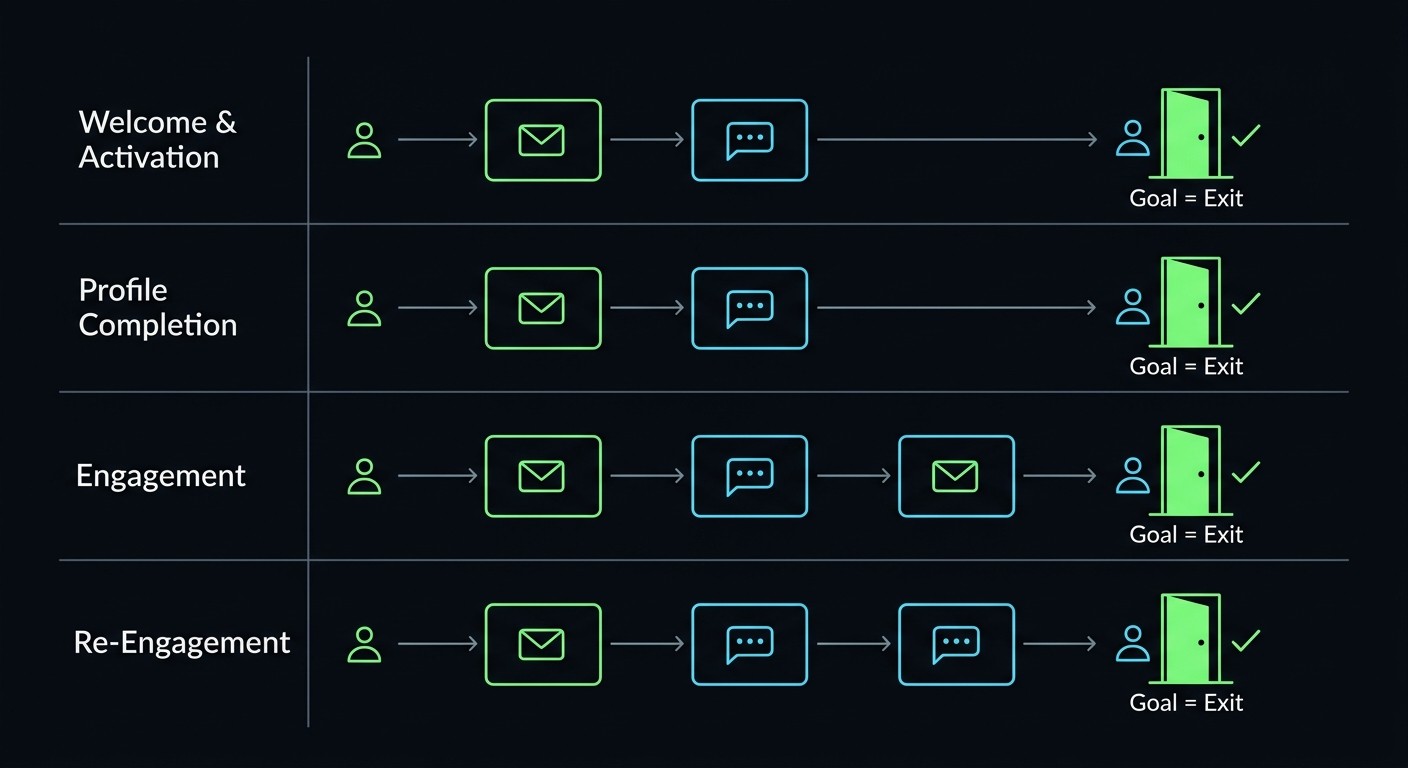
| Series | What it does | Enters when | Goal (and the cue to stop) |
|---|---|---|---|
| 1 · Welcome & Activation | A short flow that walks a brand-new member to a usable profile and their first few connections | Signed up in the last couple of days | Profile mostly complete and following a few people |
| 2 · Profile Completion | Targeted asks — import your resume, add a photo, make it shareable | Older account, profile still incomplete | Profile crosses the "done enough" line |
| 3 · Engagement | Nudges toward the first real action: a follow, an endorsement, a post | Profile's there, but they're quiet | They post or endorse for the first time |
| 5 · Re-Engagement (win-back) | Escalating "we've not seen you in a while," ending in an honest "what didn't work for you?" survey | Gone quiet for a week+, account's not brand new | They come back |
Each of these is a different conversation with a different person. Series 1 is the eager new starter. Series 5 is the person drifting away. You'd never send them the same thing — so we don't.
🛑 Goal-exit, or you become a nag
This is the most important thing I learned, and it's a product lesson, not a technical one.
In Intercom — and in most lifecycle tools — a
goal does not stop the flow. You set "profile completed" as the goal of your onboarding series and assume it stops messaging people once they complete their profile.
It does not. The goal is a
scoreboard. It counts how many people succeeded. It changes nothing about who keeps getting messaged. Intercom's own docs say it plainly: "When a customer hits your series goal they won't exit the series."
Our first build made exactly this mistake. We set goals on all four journeys — and left the exit rules empty. Which means we'd built a system that emails "hey, finish your profile!" to people who had just finished their profile. The exact failure the whole project exists to prevent.
The fix is to set an explicit exit rule that mirrors the goal: "the moment profile-complete is true, this person leaves." Two separate concepts that sound like one.
Warning
Goal ≠ exit. A goal scores success. An exit rule stops the messaging. You need both, and they have to agree. Set the goal without the exit and you'll keep nagging the people you've already won — which is worse than not messaging them at all.
Three more rules fell out of the same "say the right thing, then get out of the way" principle:
Auto-skip what they've already done. Don't send "add your bio" to someone who has a bio. Inside Series 1, each step checks the thing it's about to ask for and quietly skips itself if it's already true. The flow bends around the person instead of marching them through steps they don't need.
Match the channel to their state. Online right now? You get an in-app message. Away? You get an email. Same intent, met where you actually are.
Keep your analytics layer and your messaging layer separate. We pipe every behavioural event into PostHog for analysis. But Intercom only gets the small subset of events that actually trigger a message or give a support rep useful context. Your messaging tool should know just enough to act — not be a second, more expensive copy of your analytics.
None of that is exotic. But it's the difference between a system that feels thoughtful and one that feels like spam you opted into.
🤖 How I built it with Claude
Now the build. This is the part I think is genuinely useful, because the approach travels to almost any tool you're forced to automate from the outside.
I had a pile to build: roughly 37 individual outbound messages, then four multi-step Series to wire them into. The obvious move is to script it against the API — build once, reproduce it in staging, never hand-click a thing.
Except Intercom's
public REST API can't create any of it. Not outbound messages, not series, not surveys, not the custom attributes the whole thing keys off. The public API will happily let you create a help-centre article. It will not let you create a single onboarding email. For the actual lifecycle product, you're meant to sit in the dashboard and click. For days.
So I didn't script against the public API. I gave Claude control of a real, logged-in Intercom tab — through a browser-automation MCP — and let it work the problem from inside the dashboard itself.
Here's why that works. The Intercom dashboard is just a web app talking to Intercom's own internal API (app.intercom.com/ember/*). Those endpoints aren't public or documented — but they work perfectly when called from inside a logged-in tab, because they inherit your session cookies and your CSRF token from the page you're already on. Claude could run JavaScript right there in the page, which meant every call it made was authenticated automatically. From the server's point of view, it was the dashboard.
Warning
This is Intercom's
undocumented internal API. It can change without notice and isn't covered by their support. I'm sharing the technique because it's genuinely useful and the lessons travel — but if you do this, keep everything in draft until you've eyeballed it, and don't build production infrastructure that depends on an endpoint Intercom never promised you.
Step one: let Claude read the API by watching the app
You don't guess these endpoints — you watch for them. The recipe I gave Claude: open the network tab, do the thing once in the UI, and read off the request the app just made. Want to know how to create an email? Click "new email," watch the POST. Want to know how audiences are stored? Save a rule, read the payload. The app documents itself if you're willing to tail its own traffic — and an agent reading a network log is a lot faster at it than I am.
Every call needs the same two things: send your cookies, and pass the CSRF token sitting right there in the page's <meta> tag.
// Read fresh on every call — it's right there in the page
const csrf = document.querySelector('meta[name="csrf-token"]').content;

const headers = {
  accept: "application/json",
  "content-type": "application/json",
  "x-csrf-token": csrf,
  "x-requested-with": "XMLHttpRequest",
};
// every fetch: { credentials: "include", headers }
Step two: build loads of outbound messages
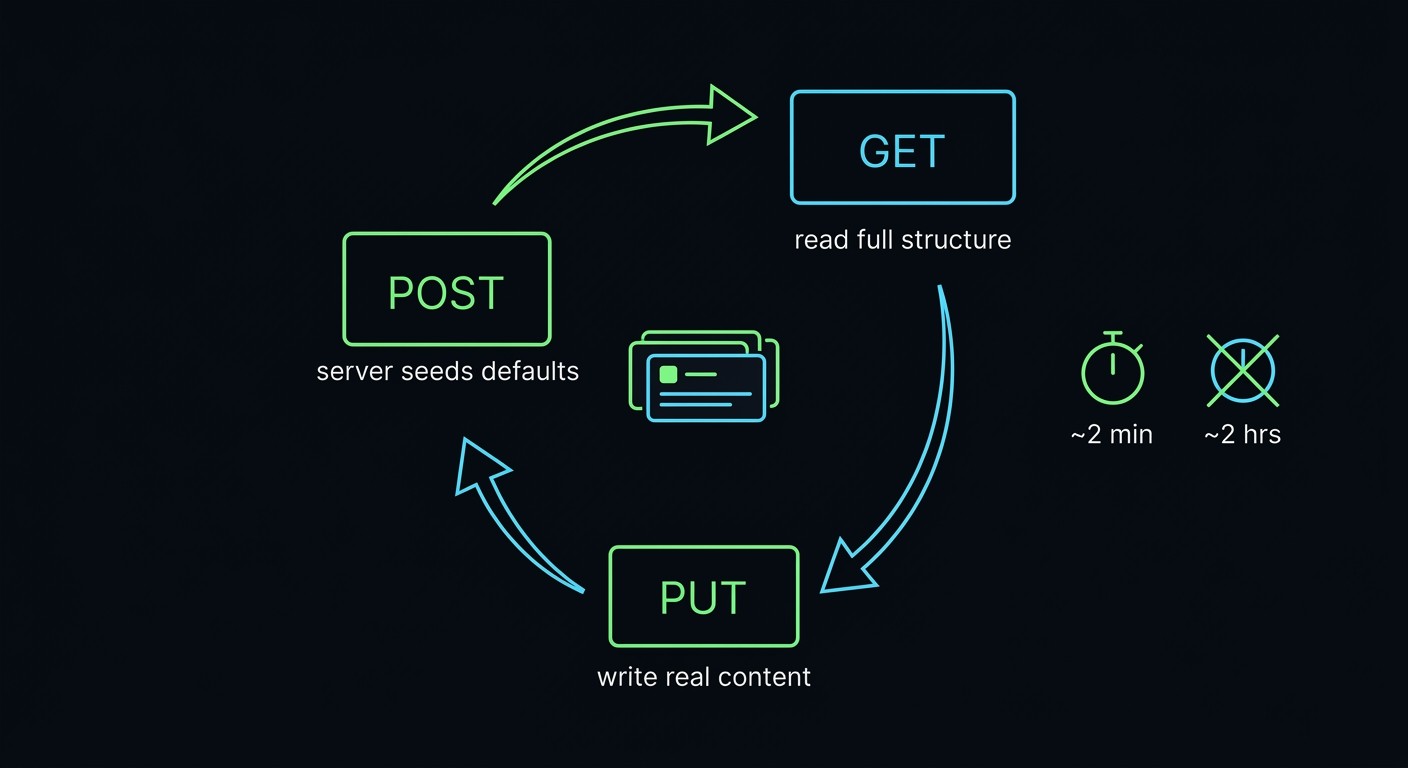
Each message in Intercom is a "ruleset." Creating one with real content is a three-step process, because the server wants to seed its own defaults before you overwrite them:
01
POST a minimal ruleset. The server creates the record, fills in a pile of default scaffolding, and hands back an
id.
02
GET that ruleset. Now you've got the full, real structure the server expects.
03
PUT the whole thing back with your actual content swapped in — subject, body, sender, template, subscription type.
POST /ember/matching_system/rulesets?app_id={app}        // → { id }
GET  /ember/matching_system/rulesets/{id}?app_id={app}   // → full object
PUT  /ember/matching_system/rulesets/{id}?app_id={app}   // ← your content
The content lives in a predictable spot — ruleset.ruleset_links[0].object — with a localized_email_contents[0] for emails and parallel shapes for chat and in-app posts. Work the shape out once and it holds for all of them. So Claude built one "golden" draft, then looped the rest: copy the content onto each new ruleset, PUT, next.
Run that loop with a throttle and you get:
37
outbound messages built via POST → GET → PUT
~2 minutes, end to end
vs. ~2 hours of UI duplicate-and-patch
0
fat-fingered senders
Step three: connect them into Series
The messages were the easy half. The Series — the branching flow-charts — were supposedly impossible to automate.
An earlier look had concluded exactly that: the Series builder is a drag-and-drop canvas, the boxes are placed with native browser drag events, and you can't realistically fake those from a script. Verdict: this part is UI-only, budget five or six hours of manual dragging per build. Fair enough on the face of it.
But that conclusion was about the interface, not the data. So I had Claude look at the data instead. Turns out the entire canvas — every box and every arrow — is just two arrays hanging off the series object: nodes (the boxes) and edges (the arrows between them). And if you PUT a series with those arrays populated,
Intercom renders the canvas from them. The drag-and-drop was never the source of truth. It was just a pretty editor for two lists.
// A node = a box on the canvas (a message step, a wait, a condition…)
{ id, x_position, y_position, node_type, object_type, ruleset_id }

// An edge = an arrow between two boxes
{ predecessor_id, successor_id, edge_type }   // edge_type 0 = plain linear step

PUT /ember/series/series/{id}?app_id={app}    // ← nodes[] + edges[] = a rendered flow
That single realisation turned a five-or-six-hour manual drag job into a scripted build. Four full journeys — steps, waits, conditions, branches — wired up from a reusable builder instead of by hand. The "impossible" part took minutes.
Tip
When something looks un-automatable, separate the interface from the data. A drag-and-drop canvas, a wizard, a fancy form — they're almost always just a UI sat on top of a boring data structure. Find the structure and the "you have to do this by hand" wall falls over. An AI agent that can read network traffic is very good at finding it.
There are a dozen sharp edges I won't drown you in — waits are a special node measured in seconds, chat messages 422 unless you hand them a specific config object, and there's one genuinely nasty trap where PUTting a series back with the server's own read-only fields silently wipes your entire flow (200 OK, zero nodes). We wrote all of it up into an internal reproduction guide so the next person — or me, in six months when Intercom's quietly renamed three fields — doesn't have to rediscover it from scratch. Which brings me to the bug.
🐛 Intercom's relative dates are backwards
I had the whole thing built, then nearly shipped a regression to five audiences because I trusted my mental model over the screen in front of me. Claude walked straight past it too.
Intercom lets you target people by relative dates — "signed up in the last 2 days," "not seen for more than 14 days." Under the hood those are stored as an operator and a number of days. And the operators are backwards from every instinct you have.
The stored operator that reads as "less than" actually means "more than N days ago." The one that reads as "greater than" means "less than N days ago" — i.e. recent. So a rule that looks, raw, like "signed up < 2" is in fact "signed up more than 2 days ago." The exact opposite of what your brain tells you.
Neither of us knew that. So I confidently "fixed" five audiences to match what I thought the operators meant — and turned all five into regressions.
What saved us wasn't a test. It was that Intercom renders every rule back to you in plain English on the series overview — "signed up less than 2 days ago." I read the rendered text, it said the opposite of what I'd just "fixed." Reverted all five.
The lesson: when a tool shows you a human-readable version of what you just configured,
read it. Trust the rendered English over your mental model of the API — and over your AI agent's, which is just as capable of confidently inverting an operator as you are. The UI is the source of truth for what the system will actually do.
It's a small, dumb bug. But it's the kind that ships silently — everything "works," the messages just go to the wrong people — and you only find out weeks later when your win-back campaign has been targeting your most active users.
🚦 Ship it like a dimmer, not a switch
Last thing, and it's a philosophy as much as a tactic.
When you've got a system that can email a few hundred real people, you don't flip the whole thing live at once. You roll it out like a dimmer switch.
So we did it one journey at a time, a few days apart, on a literal calendar. Welcome & Activation went live first — the safest one, because it only ever touches brand-new signups, a trickle at a time. Watch it for a couple of days. Are emails sending? Are people opening them? Is the unsubscribe rate calm? Yes? Good. Then the next one.
01
Flip one journey live.
02
Watch it for two or three days — sends, opens, and crucially no spike in unsubscribes.
03
Only then flip the next.
04
Keep everything else sitting safely in draft until it's that journey's turn.
We deliberately kept the flip a manual, one-click, human-in-the-loop step rather than auto-scheduling the lot. Not because we couldn't automate it — because for something that talks to real people in your name, the right amount of automation is "build it all automatically, then let a human decide when each one starts talking." A person watching the first two days of real sends will catch a tone problem, a broken merge field, or a backwards date rule that no green test suite ever would.
🧰 Build it yourself (or get help)
If you're putting lifecycle messaging together — in Intercom or anything like it — here's the short version:
A dead product messages everyone the same. A living one messages you based on what you've done. That's the whole point.
A goal is a scoreboard, not an exit. Set the goal and the exit rule, and make them agree. Otherwise you nag the people you've already won.
Auto-skip what they've done. The fastest way to feel like spam is to ask someone to do a thing they've already done.
Keep analytics and messaging separate. Your messaging tool should know just enough to act.
When a UI looks un-automatable, go find its data. The drag-and-drop canvas was just two arrays. Point an agent at the network tab and let it read.
Read the rendered English. Trust what the tool shows you it'll do over what you — or your AI agent — think the raw config means.
Roll out like a dimmer. One journey live, watch, then the next. Keep a human on the switch.
The whole build — reverse-engineering the API, 37 messages, four wired Series — came together in an afternoon of me and Claude going back and forth. The recipe above is most of what you'd need to do it yourself.
Want this for your product but don't fancy reverse-engineering anyone's internal API? Making a SaaS feel alive — onboarding, activation, win-back, the lot — is exactly the kind of thing I build as a fractional CTO, usually with Claude doing the grunt work. Tell me what's stalling your users — async by default, no obligation.
The Bottom Line: Lifecycle messaging sounds like a marketing chore and turns out to be a product discipline. The hard parts weren't writing emails — they were knowing when to stop sending them, modelling each person's actual state, and refusing to accept "you have to do this by hand" as an answer. Point a capable agent at the problem, build it so it bends around the person, ship it like a dimmer — and read what the screen tells you before you "fix" it.
OG1 is live at og1.app. The lifecycle system above is rolling out journey by journey as I write this.
Explore the Full Code
Star the repo to stay updated
Let's Connect
Follow for more smart home content
Follow on Twitter/X
@danmalone_mawla
Tags
intercom
lifecycle-messaging
customer-onboarding
saas
claude
automation
reverse-engineering

Related Articles
Continue reading similar content

AI Agents Built My Game in Godot, Then Ported It to Unity. Here's What I Learned
I'm building Crush Depth, a deep-sea salvage game, and AI agents write all of the code. It started in Godot 4.7, and this week the full port to Unity 6.7 got under way. Here's how I picked the engine, the numbers behind the call, and what made the agents useful.
7 min read

I Replaced CleanShot X With a Free Screenshot App I Built in One Session
A free, open-source screenshot app for the Mac. I take screenshots all day, and that meant CleanShot X. This week I replaced it with FreeShot, which I built in one session with Claude Code. Here's what it took, what it cost and what I gave up.
5 min read
Every Monday I Type /mission — 9 Claude Code Skills That Run My Business
I built 9 Claude Code skills to keep my one-person portfolio business oriented around goals, KPIs, and the actions that actually move them. Here's how the whole system works.
12 min read